Opening JSON Data with T SQL
 by
by Problem
I have heard a lot about JSON data format for exchanging data between applications. Please present a quick overview of what is JSON as an introduction to a set of examples showing how I can open JSON data in SQL Server with T-SQL.
Solution
Json data format (Java Script Object Notation) is a popular open file format for exchanging data between applications as well as receiving data from a server. There are tens of thousands of live and archived data sources available in JSON format. Around the time this tip is being prepared, Data.gov offered over 146,000 data sources available for download in JSON format. In addition, MSSQLTips.com has several prior tutorials on different ways of handling JSON formatted data with SQL Server relational databases .
This tip especially targets T-SQL analysts who need to ramp up to speed quickly and easily for displaying and importing JSON formatted data into SQL Server. The T-SQL code samples in this tip illustrate ways of displaying JSON formatted data in SQL Server as if they were from a SQL Server database table as well as how to transfer JSON formatted data to SQL Server tables.
Overview of JSON
While JSON is native to JavaScript, the JSON data format is widely used for exchanging data between any pair of applications – neither of which need to include JavaScript. Another common JSON use case is to store data on a server for download to client applications. You can think of a JSON data object as roughly analogous in purpose to a SQL Server table.
The JSON format is exclusively text based. If an object, such as a song or a painting, cannot be represented in text, then it cannot be within JSON document. However, at least one popular game application designates text values for different sounds within its JSON component. Similarly, an element within JSON document can point at a web page having an internet image file type, such as .jpg or .png.
Many database professionals prefer using JSON to XML for representing and exchanging data because JSON is perceived to be a simpler, lighter weight data storage format. XML documents for representing data require tags. The tags add to the weight (length) of a document representing an object. These tags can add to the length and transfer time of data across the world wide web. Also, there can be custom rules (XSDs) surrounding the interpretation of the tags in an XML document. The XSDs for XML documents add to the complexity of serializing and deserializing text into a data object within an application.
Perhaps the most distinctive JSON feature is that data is stored in key-value pairs. Each distinct key within the set of key-value pairs in some JSON formatted text is roughly analogous to a column in a SQL Server table. A key name instance must appear in double quotes. A colon delimiter (:) separates the key name from the JSON value. The value for a key can be
embraced by double quotes, no double quotes, or even be missing depending on the data type for a value.
- String data type values must be embraced in double quotes.
- Number data type values should not be embraced in double quotes.
- Null data type values indicate a missing value for a key on that row. You can also specify a missing value with a null value for a key.
Aside from string, number, and null data types, JSON data formatting also supports Boolean, array, and object data types.
- A Boolean key can be associated with values of either true or false.
- An array key-value pair is an ordered set of two or more values. An array data type instance must have its own key name. Each value within an array can be a string (varchar, nvarchar), number (int, numreric) or a null value. The collection of values within an array must be separated by commas. You can think of an array as a tuple with a name. An array data type must be wrapped in square brackets ([]). A key-value pair for an array can be specified within a JSON document at the top level or within another object, such as a JSON data object instance.
- A JSON data object is a collection of one or more key-value pairs. The set of key-value pairs for an object must be embraced in curly braces ({}). If there is more than one key-value pair within a data object type instance, then the pairs must be separated by commas. Each nested key name can appear just once per data object type instance. The key-value pairs within an object data type can be any data type. Data object instances can be nested within other JSON objects or they can be top-level instances within a JSON document. When a data object instance is nested within another data object, then the nested object should have a key name. Top-level data object instances do not require key names, but top-level object instances should be separated by commas from one another within a JSON document.
T-SQL examples for processing JSON data
This section presents progressively more advanced T-SQL programming examples for parsing JSON formatted text. There are sub-sections on
- Converting JSON text strings built from the six basic JSON data types into SQL Server results sets with a default schema for displaying values
- Constructing JSON text strings that nest JSON data types within other JSON data types and then displaying the converted string values as rowsets within SQL Server
- Specifying a custom schema instead of just using the default schema for representing key-value pairs as if the underlying values originated from another SQL Server rowset
- Copying converted JSON text values into SQL Server tables for manipulation and display within SQL Server
Getting started with the openjson function in SQL Server
SQL Server instances with a compatibility level of 130 or higher (for SQL Server 2016+) make available the openjson table-valued function for parsing text in JSON format into columns and rows for display within a SQL query. The text must have a nvarchar data type. This Unicode specification of the input allows the openjson function to process international character sets.
Here is a simple T-SQL example illustrating some syntax guidelines for using the openjson function. The script begins with a use statement designating JsonDataProcessing as the default database name. You can use any other database that you prefer. Notice the local variable named @json has a nvarchar data type with a length of up to the maximum number of characters for nvarchar (about 2 gigabyte characters).
- There are eight key-value pairs in the @json local variable.
- The key name appears first within each pair; its value is always
embraced in double quotes.
- A semicolon separates the key name from the type value that appears
after the semicolon delimiter within a pair.
- The format for type values depend on the type.
- Type values that represent strings, such as the types for the
string_value key, the elements in the array_value key, and the element in
the object key are embraced by double quotes.
- The two number_value keys do not require double quotes around the
type value. The type value can be for an integer or any valid floating
point value in SQL Server with a decimal point.
- The boolean_value keys have type values of either true or false
without double quotes.
- The array_value key embraces its elements in square brackets ([]).
- The object_value key embraces its element in curly braces ({}).
- The null_value key specifies a type value of null to indicate there is no value designated for the key.
Notice that there is a select statement after the assignment of text representing JSON values to the @json local variable. The select statement displays the text in the @json local variable value as a table within SQL Server.The select statement uses the default schema for representing JSON values within the @json local variable. Here is the valid JSON:
use JsonDataProcessing
go

-- Json key name and type values
-- using type names for key values
-- array elements are string values
-- object element is for obj key with a string value
declare @json nvarchar(max) = N'{
   "String_value": "Json key name and type values",
   "Number_value": 12,
   "Number_value": 12.3456,
   "Boolean_value": true,
   "Boolean_value": false,
   "Null_value": null,
   "Array_value": ["r","m","t","g","a"],
   "Object_value": {"obj":"ect"}
}';
select * from openjson(@json);
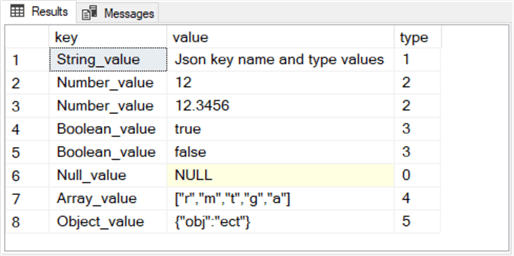
Here is the results set from the trailing select statement in the preceding script. The @json value has a nvarchar data type populated with JSON formatted text. The results set has three columns for the key name, the type value, and a type number associated with each value type.
- There are eight rows in the results set because there are eight
key-value pairs.
- The first column from the default schema contains successive key
name values for each of the eight pairs.
- The second column from the default schema shows the value for
successive key-value pairs.
- The third column displays a number representing the type value in
the key-value pair for a row.
- 0 is for a null type
- 1 is for a string type
- 2 is for a number type
- 3 is for a Boolean type
- 4 is for an array type
- 5 is for an object type
Here is another simple example for displaying JSON formatted data in SQL Server with the openjson function.
- Notice that the script starts with a go statement. This is required
when you have two local variables with the same name in a single T-SQL
script. The go statement can keep the different declarations for each
instance of a local variable with the same name in different batches, so
they do not conflict with one another.
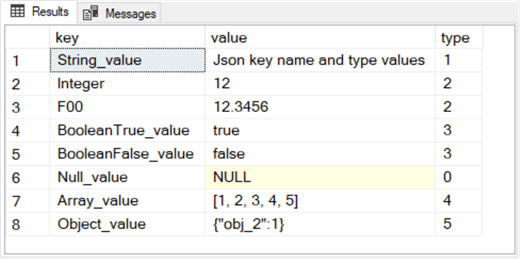
- All the key names in the preceding script denote the name of the
type value for a key. However, this is not necessary.
- For example, the key with a value of 12.3456 has a name of F00.
This key name is different than in the preceding script for the key-value
pair with a value of 12.3456, which you can confirm to have a name of
Number_value.
- Similarly, both Boolean values in the preceding script have a name
of Boolean_value whether the type value is true or false. However, in the
following script,
- when the type value is true, then the key name is BooleanTrue
- when the type value is false, then the key name is BooleanFalse
- The following JSON script additionally confirms that array and object element values can be number values and not just strings.
-- Json key name and type values
-- using selected other values than type names for key values
-- array elements are number values
-- object element is a number value
declare @json NVARCHAR(2048) = N'{
   "String_value": "Json key name and type values",
   "Integer": 12,
   "F00": 12.3456,
   "BooleanTrue_value": true,
   "BooleanFalse_value": false,
   "Null_value": null,
   "Array_value": [1, 2, 3, 4, 5],
   "Object_value": {"obj_2":1}
}';
select * from openjson(@json);
Here is the output from the select statement in the preceding script for your easy reference.
Constructing, converting, and displaying JSON data types with other JSON data types nested within them
Instead of just having one JSON object within a nvarchar string, you can insert multiple Json objects within a string. Here is an example of some T-SQL code for implementing this capability. There are two distinct objects in the nvarchar string representing the JSON data.
- One object has a nested id key with a value of 2 and an age property of 25.
- The second object has a nested id key of 5. This second object does not have an age key, but it does have date-of-birth (dob) key. The dob value is a string with 2005-11-04T12:00:00.
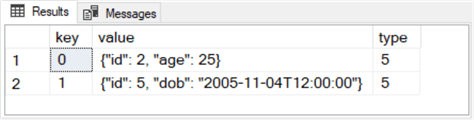
The select statement at the end of the script outputs a separate row for each object. Objects are not explicitly assigned key names in the nvarchar string because they are top -level objects within the JSON document. Therefore, SQL Server arbitrarily assigns sequential integer values to a key field value when displaying the results set with the default schema.
-- two json objects in a nvarchar string
-- select statement uses the default schema
declare @json nvarchar(max);
set @json = N'[
  {"id": 2, "age": 25},
  {"id": 5, "dob": "2005-11-04T12:00:00"}
  ]';
select * from openjson(@json)
Here is the results
set from the preceding script.
- A key column is added to the result set even though it does not
appear in the nvarchar string with the JSON formatted data.
- A key value of 0 is assigned automatically to the first object in
the string.
- A key value of 1 is assigned automatically to the second object in
the string. The second object has a dob key value of November 4, 2005.
The time of birth is recorded as 12 AM.
- The type object for both rows is a 5, which denotes a JSON object.
The objects within
a JSON document can also have nested objects within them. Here is a T-SQL
example of how to represent this kind of relationship.
- The nested object in the example has a key name of info. Within the
nested info object are two keys.
- The first key in the info object has a key of name. The name key
is for the first name of a person associated with the outer top-level
object.
- The second key in the info object has a key name of surname. The
surname key is for the last name of a person associated with the outer
top-level object.
- The person name for the first top-level object is John Smith.
- The person name for the second top-level object is Jane Smith in the following example:
-- two json objects, each with a nested object, in a nvarchar string
-- with default schema for results set from select statement
declare @json nvarchar(max);
SET @json = N'[
  {"id": 2, "info": {"name": "John", "surname": "Smith"}, "age": 25},
  {"id": 5, "info": {"name": "Jane", "surname": "Smith"}, "dob": "2005-11-04T12:00:00"}
]';
select * from openjson(@json)
The output from the preceding script appears next.
- The info key appears after the id key and before the age or dob keys.
- You can see John Smith as the name and surname key values, respectively, for the object with a key value of 0.
- Similarly, Jane Smith is the name and surname key values, respectively, for the object with a key value of 1.

Specifying custom schemas and displaying results through them
Using the default schema in a select statement is a quick and easy way to display JSON content from a local variable with the openjson function, but there are likely to be times when an application can benefit from a custom schema for displaying JSON content. With a custom schema, you can display native JSON content as if it were from a table in a SQL Server database.
There are just six JSON data types, and none of them is for a date. Therefore, if a select statement displays some JSON content that contains a datetime value with the default schema, the select statement displays the datetime value as a string in SQL Server. However, if you use a custom schema, you can transform the display so that it matches one of SQL Server’s datetime representations for the datetime value. In addition, there are many other benefits that custom schemas provide. This sub-section introduces you to some of these advantages, and another subsequent sub-section reinforces the benefits illustrated in this sub-section while also illustrating additional benefits.
You can specify a custom schema by using a with clause in a select statement. The with clause allows your code to associate a SQL Server data type representation to the type value for key-value pair within a JSON formatted string. This capability enables a select statement to display the content in a JSON document as if it were a value from a SQL Server table. In addition, key values for individual key-value pairs are separated into individual columns as if they were values from the columns of a SQL Server table.
Here is an
adaptation of the prior code sample that includes a with clause as part of the
select statement.
- The with clause in this example trails the from clause of the
select statement.
- Five JSON keys are specified within the with clause.
- The id key is associated with an int data type.
- The id name at the beginning of the first line within the with
clause specifies the column name for the id key values.
- Next, the int data type name within the first line dictates how
the id key value appears in the results set from the select statement.
- Finally, the ‘$.id’ specification at the end of the first line
within the with clause references the id value from the id key-value
pairs within the @json local variable.
- The info.name key is associated with a nvarchar(50) data
specification whose column name is firstname.
- The info.surname key is also associated with a nvarchar(50) data
specification. The column name for info.surname in the results set is
lastname.
- The age key is associated with a SQL Server int data type. Because
the column name in the results set is that same as the age key in the
@json local variable, there is no need to separately designate the age
key name on the fourth line inside the with clause.
- The fifth column in the results set is named dateOfBirth. This column displays as if it had a SQL Server datetime2 data type specification, and the key values are from the dob key within the @json local variable.
-- two json objects, each with a nested object, in a nvarchar string
-- with custom schema for results set from select statement
-- specified via with clause
declare @json NVARCHAR(MAX);
set @json = N'[
  {"id": 2, "info": {"name": "John", "surname": "Smith"}, "age": 25},
  {"id": 5, "info": {"name": "Jane", "surname": "Smith"}, "dob": "2005-11-04T12:00:00"}
]';
select *
from openjson(@json)
  with (
    id INT '$.id',
    firstName NVARCHAR(50) '$.info.name',
    lastName NVARCHAR(50) '$.info.surname',
    age int,
    dateOfBirth datetime2 '$.dob'
  );
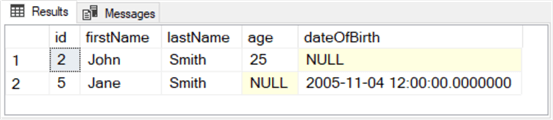
Here is the output from the preceding T-SQL script.
- There is a separate column for each key name referenced by the with clause.
- The id, firstname, and lastname column values in the following results set exactly match the id, name, and surname key values from the preceding results set at the end of the previous sub-section.
- A null value appears for the dateOfBirth column for the row with an id value of 2 in the following results set, and there is no dob key value in the preceding results set for the object with an id key value of 2.
- Also, a null value appears for the age column for the row with an id value of 5 in the following results set, and there is no age key value in the preceding results set for the object with and key value of 5.
Copying key values from two different JSON documents into SQL Server for a join in SQL Server
This sub-section illustrates how to insert values from two different JSON documents into two different SQL Server tables. Then, it shows how to join the two SQL Server tables based on the values from key-value pairs from the original JSON documents.
Here is a script to copy a JSON document (@json) into a SQL Server table (dbo.sym_price_vol).
- The script starts with a drop table if exists statement so that the
script can create and populate a fresh copy of the dbo.sym_price_vol table
via the into clause of a select statement.
- Next, a declare statement assigns text from a JSON document to the
@json local variable. There are four objects in @json.
- Two objects have ticker_sym key values of TSLA. Two more objects
have ticker_sym key values of MSFT.
- The two objects for each ticker_sym key are distinct by their date
key value. The distinct date key values are April 16, 2021 or April 19,
2021.
- In addition to the ticker_sym and date keys, each JSON object has
keys for open and close prices as well as a number value for the volume
of shares traded on a date. The open and close prices as well as share
volumes are not end-of-day values because the prices and volumes were
taken during the trading dates in spite of the date value assignments.
- A select statement after the @json declaration statement reads the
SQL Server formatted JSON keys and values. An into clause within the
select statement transfers the SQL Server formatted values into the
dbo.sym_price_vol table.
drop table if exists dbo.sym_price_vol
go
-- populate SQL Server table (dbo.sym_price_vol) with json string (@json)
declare @json nvarchar(max);
set @json = N'[{
"ticker_sym": "TSLA",
"date": "2021-04-19T12:00:00",
"open": 719.60,
"close": 714.63,
"vol": 39597000},
{
"ticker_sym": "TSLA",
"date": "2021-04-16T12:00:00",
"open": 728.65,
"close": 739.78,
"vol": 27924000},
{
"ticker_sym": "MSFT",
"date": "2021-04-19",
"open": 260.19,
"close": 258.74,
"vol": 23195800},
{
"ticker_sym": "MSFT",
"date": "2021-04-16",
"open": 259.47,
"close": 260.74,
"vol": 24856900}
]';
select *
into dbo.sym_price_vol
from openjson(@json)
with (
      ticker_sym nvarchar(20),
      date date,
      [open] money,
      [close] money,
       vol bigint
    )
Here is a second script to populate two rows in the dbo.sym_attribute table with values from another JSON formatted document. The purpose of the table is to store three attributes (shortName, sector, and industry) for each of two symbols (TSLA and MSFT). Because this script segment is designed to run optionally immediately after the preceding script it starts with a go keyword. The go keyword creates a fresh batch so that using a new declaration statement for a local variable named @json does not create a name conflict for the @json local variable.
- There are two objects in the @json local variable.
- One object has a ticker_sym key of TSLA.
- The other object has a ticker_sym key of MSFT.
- Within each of the two JSON objects, there are three additional
key-value pairs. As you can see, the key names are
- ShortName, whose corresponding value is the name for the company
represented by the ticker_sym
- sector, which is the name for a large group of symbols to which
the ticker_sym value belongs
- industry is the name for a subset of symbols in the sector. The
ticker_sym key value belongs to the industry group within the sector
group.
- The select statement at the end of the script segment copies the extracted values from @json into the dbo.sym_attribute table.
drop table if exists dbo.sym_attributes
go
-- populate SQL Server table (dbo.sym_attributes) with json string (@json)
declare @json NVARCHAR(MAX);
set @json = N'[{
"ticker_sym": "TSLA",
"shortName": "Tesla, Inc.",
"sector": "Consumer Cyclical",
"industry": "Auto Manufacturers"},
{
"ticker_sym": "MSFT",
"shortName": "Microsoft Corporation",
"sector": "Technology",
"industry": "Software—Infrastructure"}
]';
select *
into dbo.sym_attributes
from openjson(@json)
with (
      ticker_sym nvarchar(20),
      shortName nvarchar(50),
      sector nvarchar(50),
      industry nvarchar(50)
)
Here are some
select statements for displaying the dbo.sym_price_vol and dbo.sym_attributes
tables separately as well as joined together.
- The first two select statements display the values in
dbo.sym_price_vol and dbo.sym_attributes tables. Each of these tables is
populated from a different string value for the @json local variable.
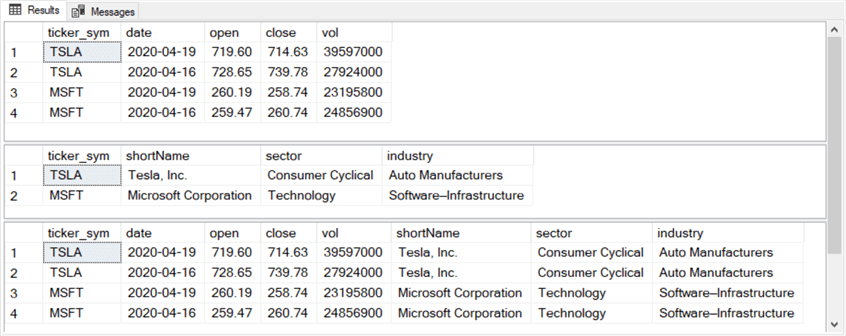
- The third select statement joins dbo.sym_price_vol and dbo.sym_attributes tables by their ticker_sym column values.
- The top pane shows the results set from the first select statement. This statement shows the values from the dbo.sym_price_vol table.
- The middle pane shows the results set from the second select statement. This statement shows the values from the dbo.sym_attributes table.
- The bottom pane shows the results set from the third select statement. This statement shows the results set from the join of dbo.sym_price_vol and dbo.sym_attributes.
- If you just want to get a hands-on feel for how the code works, run each successive code segment and study the JSON input and output from the T-SQL to understand how the code operates on the JSON formatted input data to generate a results set.
- If you want to apply some T-SQL code to some of your own JSON data with the exact same format as one of the examples in this tip, then copy your own JSON formatted data over the assignment statement for the nvarchar field from the T-SQL sample that you want to apply. Then, just run the sample code.
- If you are interested in processing some JSON formatted data that is not exactly like one of the samples in this tip, find the sample that is closest in format to the format of your own JSON data.
- Then, modify your own JSON data so that it matches the format of one of the examples in this tip. Confirm that the code works for the modified version of your own data.
- Next, gradually (or in one step) change the @json assignment statement so that it is closer to (or fully matches) your original source JSON data. Remember to update the T-SQL code based on the modified layout of the JSON data.
- Run the code on the modified nvarchar field value. Debug the input or the code for the modified data until the code correctly displays the key-value pairs within SQL Server.
- If necessary, repeat the prior two steps until the nvarchar assignment data exactly matches your original source data and the code runs correctly.
-- display two populated tables from json values
select * from dbo.sym_price_vol
select * from dbo.sym_attributes

-- join two tables populated with json data
select
 sym_price_vol.*
,sym_attributes.shortName
,sym_attributes.sector
,sym_attributes.industry
from dbo.sym_attributes
inner join dbo.sym_price_vol
on sym_attributes.ticker_sym = sym_price_vol.ticker_sym
Here are the results sets from the three preceding select statements.
Next Steps
This tip's download file contains a single T-SQL script with commented blocks that can generate all the results displayed in this tip. All T-SQL samples include one or more nvarchar declarations with assignments for some source JSON formatted data.
Statistics Says It All
16
Years of Experience
3000
Gratified Students
100
Training Batches
9600
Training Hours
Subscribe
Please subscribe our technical blog to get recent updates.