Dynamic Data Masking in Sql Server 2016
 by
by Dynamic Data Masking in Sql Server 2016
Dynamic data masking is one of the new Security Feature introduced in Sql Server 2016. It provides a mechanism to mask the data from non-privileged users. The users with sufficient permission will have complete access to the actual or un-masked data.
Normally, the application layer takes care of masking the data and displaying it. For example: from database layer we will get a clear SSN number like 123-321-4567, but the application will mask and display it to the user as XXX-XXX-4567. With dynamic data masking from database layer only we can return the query result with masked data if user doesn’t have sufficient permission to view the actual/Unmasked data.
Row level security in Sql Server 2016
Dynamic data masking functions/rule can be defined on the table columns for which we need the masked out-put in the query result. It doesn’t change the actual value stored in the column. Masking function is applied on the query result just before returning the data, if user doesn’t have the enough permission to get the un-masked data. But user with db-owner or UNMASK permission will get the un-masked data in the query result for the masked columns. Masked out-put will be of the same data type as the column data type, in that way we can readily use this feature without really needing changes to the application layer.
New Features in Sql Server 2016
Following are the four masking functions which can be defined on table column
- Default
- Email
- Partial
- Random
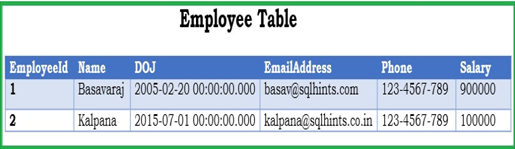
To understand each of these masking function let us create a Customer Table as shown in the following image by the following script:
Script:
CREATE DATABASE sqlhintsddmdemo |
Let us now understand one-by-one the dynamic data masking functions. These functions can be applied to columns during table creation or can be added to the existing table columns.
Let us now understand one-by-one the dynamic data masking functions. These functions can be applied to columns during table creation or can be added to the existing table columns.
1. Default()
This dynamic data masking functions behavior is based on the data type of the column on which it is applied
- For string types it shows X for each character and max it displays 4 X’s.
- For numeric types it shows 0
- For dates shows 1900-01-01 00:00:00.000
Let us apply the DEFAULT dynamic data masking function on the Name and DOJ columns of the Employee table by executing the following statement.
This dynamic data masking functions behavior is based on the data type of the column on which it is applied
- For string types it shows X for each character and max it displays 4 X’s.
- For numeric types it shows 0
- For dates shows 1900-01-01 00:00:00.000
Let us apply the DEFAULT dynamic data masking function on the Name and DOJ columns of the Employee table by executing the following statement.
---Add DEFAULT() masking function on the Name column ---Add DEFAULT() masking function on the Name column |
Let us create a new user and grant select permission on the Employee table by executing the following query.
| --Create user reader CREATE USER reader without login --Grant select permission to the user: reader GRANT SELECT ON employee TO reader |
Let us try to fetch the records from the Employee table by executing the query in the context of this new user
| EXECUTE AS USER = 'reader' SELECT * FROM employee REVERT |
RESULT:
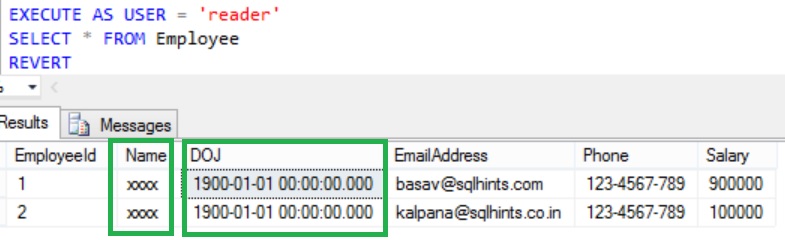
From the result we can see that Name column values are replaced by XXXX and DOJ column values are replaced by 1900-01-01 00:00:00.000 in the query result.
Grant UNMASK permission to the newly created user reader to allow viewing of the un-masked data by executing the following query.
From the result we can see that Name column values are replaced by XXXX and DOJ column values are replaced by 1900-01-01 00:00:00.000 in the query result.
Grant UNMASK permission to the newly created user reader to allow viewing of the un-masked data by executing the following query.
From the result we can see that Name column values are replaced by XXXX and DOJ column values are replaced by 1900-01-01 00:00:00.000 in the query result.
Grant UNMASK permission to the newly created user reader to allow viewing of the un-masked data by executing the following query.
--Grant Unmask permission to the user: reader |
Now try re-executing the previously executed query to fetch the records from the Employee table in the context of the user reader
Now try re-executing the previously executed query to fetch the records from the Employee table in the context of the user reader
Now try re-executing the previously executed query to fetch the records from the Employee table in the context of the user reader
EXECUTE AS USER = 'reader' |
RESULT:
RESULT:
RESULT:
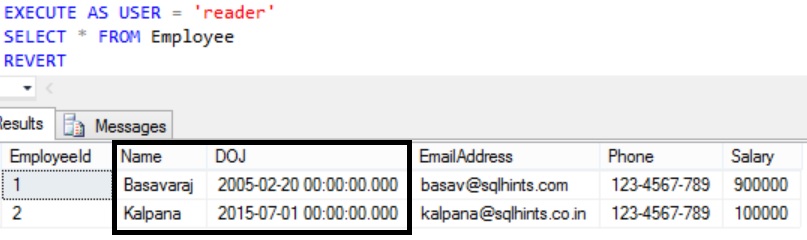
From the result we can see that now the reader user can see the un-masked or actual data of the masked columns Name and DOJ.
Let us remove the UNMASK permission from the user reader by executing the following statement
From the result we can see that now the reader user can see the un-masked or actual data of the masked columns Name and DOJ.
Let us remove the UNMASK permission from the user reader by executing the following statement
From the result we can see that now the reader user can see the un-masked or actual data of the masked columns Name and DOJ.
Let us remove the UNMASK permission from the user reader by executing the following statement
--Remove Unmask permission from the user: reader REVOKE unmask TO reader |
2. Email()
This dynamic data masking function returns first character as it is and rest is replaced by XXX@XXXX.com.
Let us apply the EMAIL dynamic data masking function on the EmailAddress Column of the Employee table by executing the following statement
2. Email()
This dynamic data masking function returns first character as it is and rest is replaced by XXX@XXXX.com.
Let us apply the EMAIL dynamic data masking function on the EmailAddress Column of the Employee table by executing the following statement
2. Email()
This dynamic data masking function returns first character as it is and rest is replaced by XXX@XXXX.com.
Let us apply the EMAIL dynamic data masking function on the EmailAddress Column of the Employee table by executing the following statement
This dynamic data masking function returns first character as it is and rest is replaced by XXX@XXXX.com.
Let us apply the EMAIL dynamic data masking function on the EmailAddress Column of the Employee table by executing the following statement
---Add Email() masking function on the Name column ALTER TABLE employee ALTER COLUMN emailaddress ADD masked WITH (FUNCTION='Email()') |
Let us try to fetch the records from the Employee table by executing the query in the context of the user reader
Let us try to fetch the records from the Employee table by executing the query in the context of the user reader
Let us try to fetch the records from the Employee table by executing the query in the context of the user reader
Let us try to fetch the records from the Employee table by executing the query in the context of the user reader
EXECUTE AS USER = 'reader' |
RESULT:
RESULT:
RESULT:
RESULT:
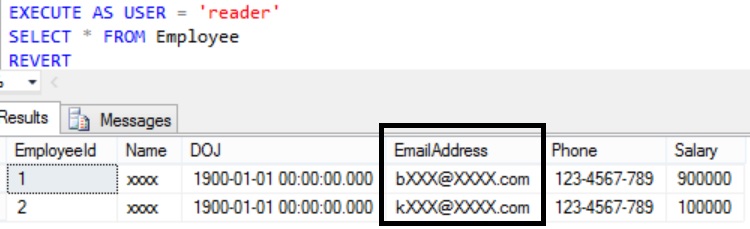
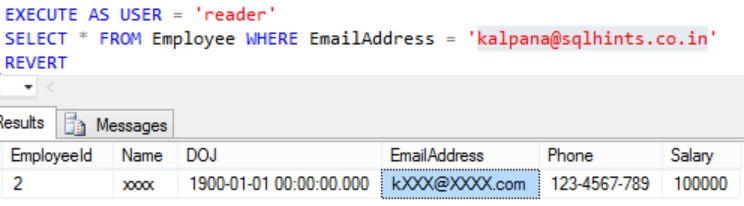
From the result we can see that Email column values are replaced by first character as it is followed by XXX@XXXX.com in the query result.
In the below example trying to fetch a employee record whose EmailAddress is kalpana@sqlhints.co.in in the context of the user reader
From the result we can see that Email column values are replaced by first character as it is followed by XXX@XXXX.com in the query result.
From the result we can see that Email column values are replaced by first character as it is followed by XXX@XXXX.com in the query result.
In the below example trying to fetch a employee record whose EmailAddress is kalpana@sqlhints.co.in in the context of the user reader
EXECUTE AS USER = 'reader' |
RESULT:
3. Partial()
This dynamic data masking function provides a mechanism where we can reveal first and last few specified number of characters with a custom padding string in the middle.
RESULT:
3. Partial()
This dynamic data masking function provides a mechanism where we can reveal first and last few specified number of characters with a custom padding string in the middle.
RESULT:
3. Partial()
This dynamic data masking function provides a mechanism where we can reveal first and last few specified number of characters with a custom padding string in the middle.
| partial (prefix, padding, suffix) |
Let us apply the PARTIAL dynamic data masking function on the Phone column of the Employee table by executing the following statementWhere: prefix is the starting number of characters to be revealed and suffix is the last number of characters to be revealed from the column value. Padding is the custom padding string in the middle.
Let us apply the PARTIAL dynamic data masking function on the Phone column of the Employee table by executing the following statementWhere: prefix is the starting number of characters to be revealed and suffix is the last number of characters to be revealed from the column value. Padding is the custom padding string in the middle.
Let us apply the PARTIAL dynamic data masking function on the Phone column of the Employee table by executing the following statementWhere: prefix is the starting number of characters to be revealed and suffix is the last number of characters to be revealed from the column value. Padding is the custom padding string in the middle.
Let us apply the PARTIAL dynamic data masking function on the Phone column of the Employee table by executing the following statementWhere: prefix is the starting number of characters to be revealed and suffix is the last number of characters to be revealed from the column value. Padding is the custom padding string in the middle.
ALTER TABLE employee ALTER COLUMN phone ADD masked WITH (FUNCTION='Partial(2,"-ZZZ-",2)') |
Let us try to fetch the records from the Employee table by executing the query in the context of the user reader
Let us try to fetch the records from the Employee table by executing the query in the context of the user reader
Let us try to fetch the records from the Employee table by executing the query in the context of the user reader
Let us try to fetch the records from the Employee table by executing the query in the context of the user reader
EXECUTE AS USER = 'reader' |
RESULT:
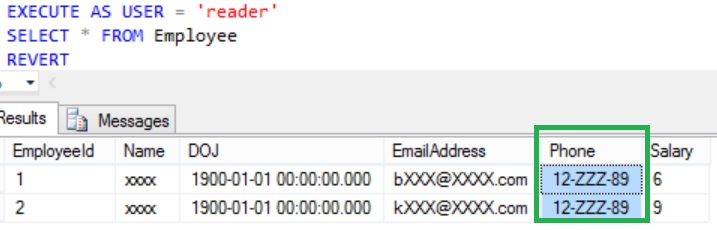
From the result we can see that Phone’s first and last 2 characters are revealed in the masked result and in the middle it is padded by the string -ZZZ-.
4. Random()
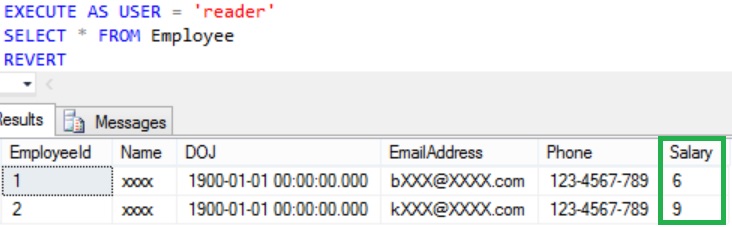
This dynamic data masking function can be applied on a column of numeric type. It returns a random value between the specified ranges.
Let us apply the RANDOM dynamic data masking function with a random value range from 1 to 9 on the Salary column of the Employee table by executing the following statement.
RESULT:
RESULT:
RESULT:
From the result we can see that Phone’s first and last 2 characters are revealed in the masked result and in the middle it is padded by the string -ZZZ-.
4. Random()
This dynamic data masking function can be applied on a column of numeric type. It returns a random value between the specified ranges.
Let us apply the RANDOM dynamic data masking function with a random value range from 1 to 9 on the Salary column of the Employee table by executing the following statement.
ALTER TABLE employee ALTER COLUMN salary ADD masked WITH (FUNCTION='Random(1,9)') |
Let us try to fetch the records from the Employee table by executing the query in the context of the user reader
Let us try to fetch the records from the Employee table by executing the query in the context of the user reader
EXECUTE AS USER = 'reader' SELECT * |
RESULT:
Removing MASK definition from the Table Column
Below example shows how we can remove masked definition from the table column. Here in this example we are removing mask definition from the Phone column of the Employee table.
RESULT:
Removing MASK definition from the Table Column
Below example shows how we can remove masked definition from the table column. Here in this example we are removing mask definition from the Phone column of the Employee table.
ALTER TABLE employee ALTER COLUMN phone DROP masked |
Conclusion:
Conclusion:
Dynamic Data masking provides a mechanism to mask or the query result at the database level. The data stored in the data base is still in the clear or un-masked format. It is not a physical data encryption feature, an admin user or user with sufficient unmask permission can still see the complete un-masked data. This is a complementary security feature which is best-advised to use in-conjunction with other Sql Server Security features.
Statistics Says It All
16
Years of Experience
3000
Gratified Students
100
Training Batches
9600
Training Hours
Subscribe
Please subscribe our technical blog to get recent updates.