SQL Server 2016 Temporal Tables
 by
by Temporal tables are a new feature of SQL Server 2016. Temporal tables, also named system-versioned tables, allow SQL Server to automatically keep history of the data in the table. Temporal tables were introduced in the ANSI SQL 2011 standard and is now been released in SQL Server 2016. At the time of writing, temporal tables are supported in SQL Server 2016 and the feature is enhanced in SQL Server 2016 CTP2.1.
A system-versioned table allows you to query updated and deleted data, while a normal table can only return the current data. For example, if you update a column value from 5 to 10, you can only retrieve the value 10 in a normal table. A temporal table also allows you to retrieve the old value 5. This is accomplished by keeping a history table. This history table stores the old data together with a start and end data to indicate when the record was active.
Temporal tables are a new feature of SQL Server 2016. Temporal tables, also named system-versioned tables, allow SQL Server to automatically keep history of the data in the table. Temporal tables were introduced in the ANSI SQL 2011 standard and is now been released in SQL Server 2016. At the time of writing, temporal tables are supported in SQL Server 2016 and the feature is enhanced in SQL Server 2016 CTP2.1.
A system-versioned table allows you to query updated and deleted data, while a normal table can only return the current data. For example, if you update a column value from 5 to 10, you can only retrieve the value 10 in a normal table. A temporal table also allows you to retrieve the old value 5. This is accomplished by keeping a history table. This history table stores the old data together with a start and end data to indicate when the record was active.
These are the most common use cases for temporal tables:
- Audit. With temporal tables you can find out what values a specific entity has had over its entire lifetime.
- Slowly changing dimensions. A system-versioned table exactly behaves like a dimension with type 2 changing behavior for all of its columns.
- Repair record-level corruptions. Think of it as a sort of back-up mechanism on a single table. Accidentally deleted a record? Retrieve it from the history table and insert it back into the main table.
Temporal tables or system-versioned tables is an assertion table, meaning that it captures the lifetime of a record based on the physical dates the record was removed or updated. Temporal tables currently do not support versioning, meaning the versioning of records based on logical dates. For example, suppose you have a table keeping product prices. If you update the price at 12PM using an UPDATE statement, the temporal table will keep the history of the old price until 12PM of that day.
Starting from 12PM, the new price is valid. However, what if the price change was actually meant to start from 1PM (a logical change)? This means you have to time your update statement perfectly in order to make it work and you should have executed the UPDATE statement at 1PM instead of 12PM.
Note that temporal tables are not a replacement for the change data capture (CDC) feature. CDC uses the transaction log to find the changes and typically those changes are kept for a short period of time (depending on your ETL timeframe). Temporal tables store the actual changes in the history table and they are intended to stay there for a much longer time.
Creating a system-versioned table
When you want to create a new temporal table, a couple of prerequisites must be met:
- A primary key must be defined
- Two columns must be defined to record the start and end date with a data type of datetime2. If needed, these columns can be hidden using the HIDDEN flag. These columns are called the SYSTEM_TIME period columns.
- INSTEAD OF triggers are not allowed. AFTER triggers are only allowed on the current table.
- In-memory OLTP cannot be used
There are also some limitations:
- Temporal and history table cannot be FILETABLE
- The history table cannot have any constraints
- INSERT and UPDATE statements cannot reference the SYSTEM_TIME period columns
- Data in the history table cannot be modified
The following script creates a simple system-versioned table:
CREATE TABLE dbo.testtemporal |
If you don't specify a name for the history table, SQL Server will automatically generate one of the following structure:dbo.MSSQL_TemporalHistoryFor_xxx, where xxx is the object id of the main table.
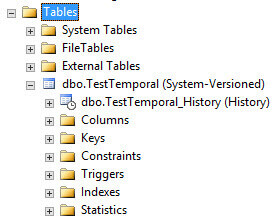
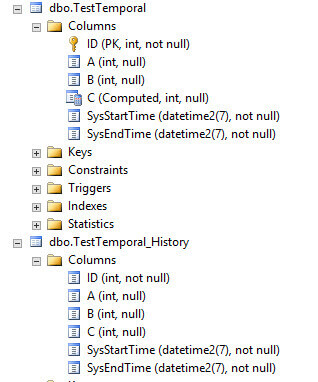
The result looks like this:
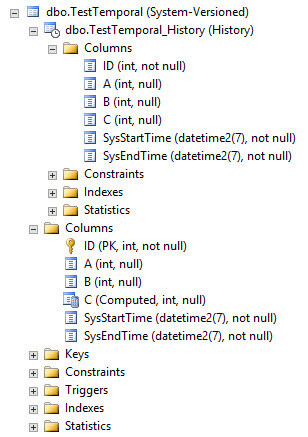
The history table has an identical set of columns, but with all constraints removed. It also has its own set of indexes and statistics. Creating your own indexes such as a clustered column store index on the history table can greatly improve performance.
Note it is also possible to enable system-versioning on an existing table. Either you already have an existing history table and you just include it in the ALTER TABLE statement, or you create one yourself. For example, if you have an existing type 2 dimension with all the history, you can create a new table with only the current values. This will become the current table and the dimension will become the history table. There is an optional clause DATA_CONSISTENCY_CHECK that allows you to perform a data consistency check to verify if time periods in the history do not overlap.
Let's test the functionality of temporal table by inserting data into the table and then modify it.
The result looks like this:
The history table has an identical set of columns, but with all constraints removed. It also has its own set of indexes and statistics. Creating your own indexes such as a clustered column store index on the history table can greatly improve performance.
Note it is also possible to enable system-versioning on an existing table. Either you already have an existing history table and you just include it in the ALTER TABLE statement, or you create one yourself. For example, if you have an existing type 2 dimension with all the history, you can create a new table with only the current values. This will become the current table and the dimension will become the history table. There is an optional clause DATA_CONSISTENCY_CHECK that allows you to perform a data consistency check to verify if time periods in the history do not overlap.
Let's test the functionality of temporal table by inserting data into the table and then modify it.
-- Initial Load |
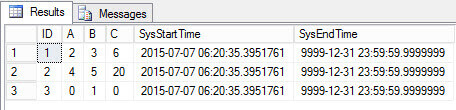
Now let's delete one row and update another.
Now let's delete one row and update another.
-- Modify Data DELETE FROM dbo.testtemporal |
The main table displays the current state of the data:
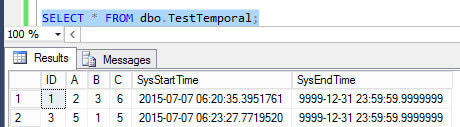
Note that the SysEndTime column is not necessary, as it only displays the maximum datetime2 value.
The history displays the old versions of the different rows and they are properly dated.
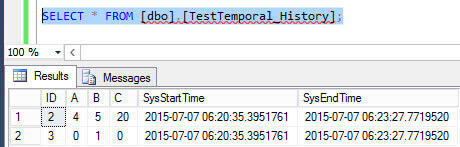
The main table displays the current state of the data:
Note that the SysEndTime column is not necessary, as it only displays the maximum datetime2 value.
The history displays the old versions of the different rows and they are properly dated.
Alter the schema of a system-versioned table
When system-versioning is enabled on a table, modifications on the table are severely limited. These are the allowed modifications:
- ALTER TABLE … REBUILD
- CREATE INDEX
- CREATE STATISTICS
All other schema modifications are disallowed. It's for example not possible to drop a temporal table.
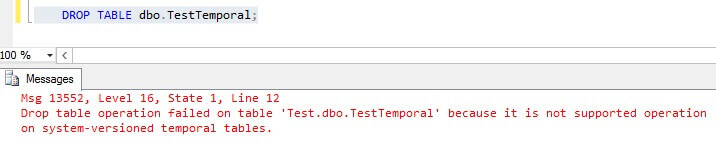
But what when you want to add new columns for example? In order to alter the schema of a temporal table, system-versioning has to be disabled first:
When system-versioning is enabled on a table, modifications on the table are severely limited. These are the allowed modifications:
- ALTER TABLE … REBUILD
- CREATE INDEX
- CREATE STATISTICS
All other schema modifications are disallowed. It's for example not possible to drop a temporal table.
But what when you want to add new columns for example? In order to alter the schema of a temporal table, system-versioning has to be disabled first:
ALTER TABLE dbo.testtemporalSET (system_versioning = OFF); |
This command will remove system_versioning and turn the main table and the history table into two regular tables.
This command will remove system_versioning and turn the main table and the history table into two regular tables.
Now you can do any modifications you like on both tables. Make sure they stay in sync and history is still consistent. After the modifications, you can turn system-versioning back on.
Now you can do any modifications you like on both tables. Make sure they stay in sync and history is still consistent. After the modifications, you can turn system-versioning back on.
| ALTER TABLE dbo.testtemporalSET (system_versioning = ON ( history_table=dbo.testtemporal_history,data_consistency_check=[ON/OFF] ) ); |
Conclusion
Conclusion
Temporal tables are an exciting new feature of SQL Server 2016. They are already included in the previews CTP2 and CTP2.1. With temporal tables, SQL Server automatically tracks history for the data into a separate history table. Possible use cases are type 2 dimensions in data warehouses, auditing, protection against unwanted deletes and updates and any other example where versioning is required.
Temporal tables are an exciting new feature of SQL Server 2016. They are already included in the previews CTP2 and CTP2.1. With temporal tables, SQL Server automatically tracks history for the data into a separate history table. Possible use cases are type 2 dimensions in data warehouses, auditing, protection against unwanted deletes and updates and any other example where versioning is required.
Statistics Says It All
16
Years of Experience
3000
Gratified Students
100
Training Batches
9600
Training Hours
Subscribe
Please subscribe our technical blog to get recent updates.