SQL Server 2016 Scoped Configuration
 by
by Problem
Microsoft recently launched SQL Server 2016 Release Candidate 2 which provides some exciting new features. In this tip we will look at the Database Scope Configuration. We are going to explore this new feature and demonstrate how to use it.
Solution
The following was done using SQL Server 2016 RC0, but SQL Server RC2 is now available as well.
Database Scoped Configurations
In SQL Server 2016 Management Studio, if we go to the Properties for a database and navigate to Options we can see a new grouping called "Database Scoped Configurations" which includes several key options.
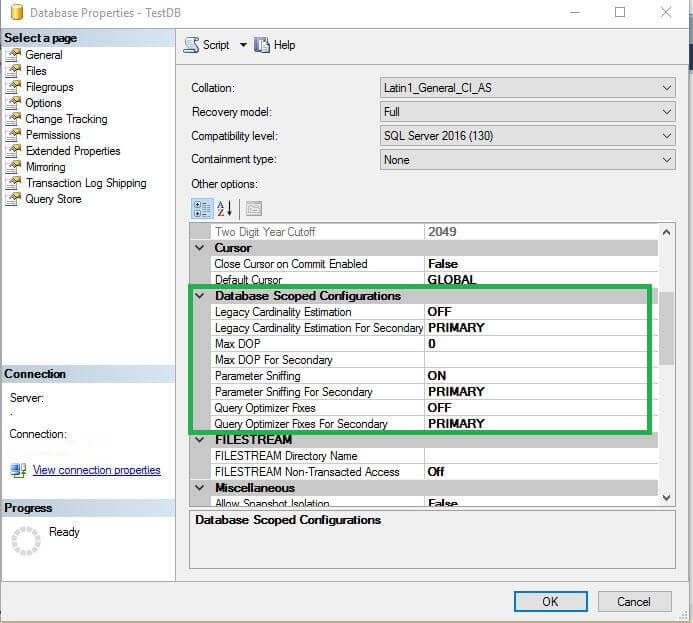
SQL Server 2016 now supports database level configurations that affect the behavior of the application code at the database level. Previously we did not have these options at the database level, these options were applicable for the entire instance. With SQL Server 2016, if we have many databases on a single instance with a variety of configuration needs, now it is easy to have more control per database.
Database scoped configuration supports the features below:
- Legacy Cardinality Estimation: This options enables you to configure the query optimizer cardinality estimation model for an individual database which is independent of the database compatibility level.
- MAX DOP: Maximum degree of parallelism for an individual database, this can be values 0, 1, 2, etc.
- Parameter Sniffing: We can set the behavior for the query optimizer to use parameter sniffing or not. In previous versions of SQL Server we could disable this feature using trace flag 4136, but now we can control it at the database level.
- Query Optimizer Fixes: By using this feature we can enable or disable query optimization hotfixes for an individual database.
Something to note above is the For Secondary options, this is because these features are supported for AlwaysOn Availability Groups and different options can be set for the primary vs. the secondary databases.
DMV to Check Current Database Scoped Configurations
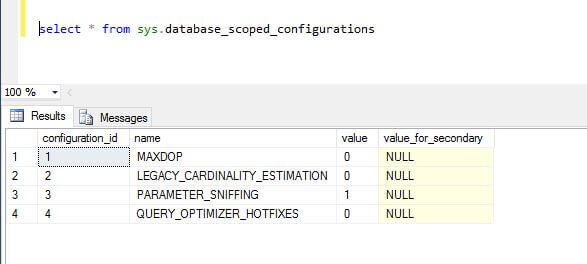
First, let's see the default values for each of these options, we can check these by querying the sys.database_scoped_configurations DMV. We can see parameter sniffing is set to ON by default and all others are OFF.
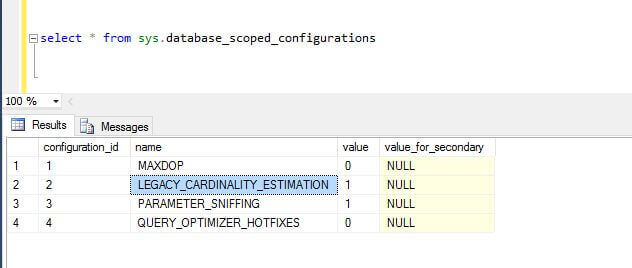
If we set LEGACY_CARDINALITY_ESTIMATION to true and rerun the query we can see it is reflected using the DMV.
Clear Individual Database Plan Cache
Another option that is new at the database level is the abiltiy to clear the plan cache for an individual database. This is done using the T-SQL command below. Note: the option to clear the plan cache is only supported for the primary database if the database is in an Availability Groups.
| ALTER DATABASE scoped configuration clear procedure_cache; |
T-SQL to Set Database Scoped Configurations
Enable Legacy Cardinality Estimation
| ALTER DATABASE scoped configuration SET legacy_cardinality_estimation = ON; |
Disable Parameter Sniffing
| ALTER DATABASE scoped configuration SET parameter_sniffing = OFF; |
Enable Query Optimizer Fixes
| ALTER DATABASE scoped configuration SET query_optimizer_hotfixes = ON; |
Set MAXDOP Value
| ALTER DATABASE scoped configuration SET maxdop = 2; |
Set Secondary Database Options
For AlwaysOn Availability Group secondary databases, the options can be set as follow. This is just one example and the other settings are done in a similar way.
| -- Enable or disable option for secondary ALTER DATABASE scoped configuration FOR secondary SET legacy_cardinality_estimation = ON; -- Set option for secondary to be the same as primary ALTER DATABASE scoped configuration FOR secondary SET legacy_cardinality_estimation = PRIMARY; |
Statistics Says It All
16
Years of Experience
3000
Gratified Students
100
Training Batches
9600
Training Hours
Subscribe
Please subscribe our technical blog to get recent updates.