Approaches to Correct Parameter Sniffing
 by
by What is Parameter Sniffing in SQL Server?
Every batch you execute, either ad-hoc or stored procedure, generates a query plan that is kept in the plan cache for future usage. SQL Server attempts to create the best query plan to retrieve the data, but what may seem obvious is not always the case with the plan cache.
The way SQL Server choses the best plan is by cost estimation. For example, if I ask you which is best, an index seek followed by a key lookup or a table scan you may answer the first, but it depends on the number of lookups. In other words it depends on the amount of data being retrieved. So the best query plan takes into consideration the cardinality estimation based on input parameters and with the help of statistics.
When the optimizer creates an execution plan it sniffs the parameter values. This is not an issue; in fact it is needed to build the best plan. The problem arises when a query uses a previously generated plan optimized for a different data distribution.
In most cases the database workload is homogeneous so parameter sniffing won’t be a problem; but on a small number of cases this becomes a problem and the outcome can be dramatic.
SQL Server Parameter Sniffing In Action
Now I will demonstrate a parameter sniffing issue with an example.
1. CREATE DATABASE script.
USE [master] go CREATE DATABASE [TestDB] containment = none ON PRIMARY ( NAME = N'TestDB', |
2. Create two simple tables.
| USE testdb go IF Object_id('dbo.Customers', 'U') IS NOT NULL DROP TABLE dbo.customers go CREATE TABLE customers ( customerid INT NOT NULL IDENTITY(1, 1), customername VARCHAR(50) NOT NULL, customeraddress VARCHAR(50) NOT NULL, [state] CHAR(2) NOT NULL, customercategoryid CHAR(1) NOT NULL, lastbuydate DATETIME, PRIMARY KEY CLUSTERED ( customerid ) ) IF Object_id('dbo.CustomerCategory', 'U') IS NOT NULL DROP TABLE dbo.customercategory go CREATE TABLE customercategory ( customercategoryid CHAR(1) NOT NULL, categorydescription VARCHAR(50) NOT NULL, PRIMARY KEY CLUSTERED ( customercategoryid ) ) CREATE INDEX ix_customers_customercategoryid ON customers(customercategoryid) |
3. The idea with the sample data is to create an odd distribution.
| USE testdb go INSERT INTO [dbo].[customers] ([customername], [customeraddress], [state], [customercategoryid], [lastbuydate]) SELECT 'Desiree Lambert', '271 Fabien Parkway', 'NY', 'B', '2013-01-13 21:44:21' INSERT INTO [dbo].[customers] ([customername], [customeraddress], [state], [customercategoryid], [lastbuydate]) SELECT 'Pablo Terry', '29 West Milton St.', 'DE', 'A', Getdate() go 15000 |
4. Execute the following query and take a look at the query plan.
USE testdb |
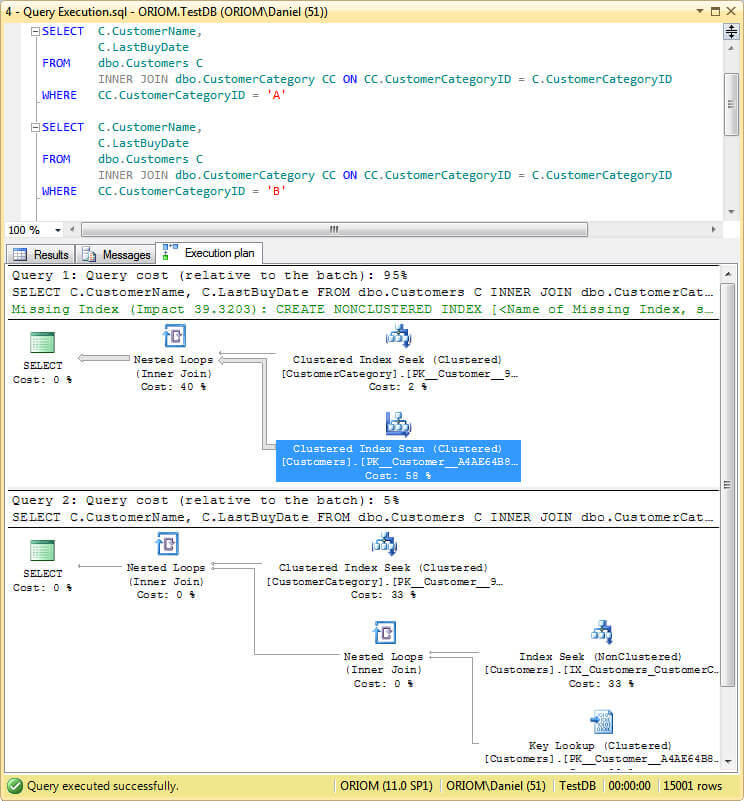
As you can see, the first query performs a clustered index seek on the CustomersCategory table and a clustered index scan on tghe Customers table whereas the second one uses the non-clustered index (IX_Customers_CustomerCategoryID). That is because the query optimizer is smart enough to anticipate our query results from the given parameters and scans the clustered index instead of performing an index seek followed by a key lookup to our non-clustered index, that would be more expensive due to the fact that our first query returns almost the entire table.
5. Now we create a stored procedure to execute our query.
| USE testdb go CREATE PROCEDURE Test_sniffing @CustomerCategoryID CHAR(1) AS SELECT C.customername, C.lastbuydate FROM dbo.customers C INNER JOIN dbo.customercategory CC ON CC.customercategoryid = C.customercategoryid WHERE CC.customercategoryid = @CustomerCategoryID go |
6. Execute the stored procedure.
| USE testdb go DBCC freeproccache() go DECLARE @CustomerCategoryID CHAR(1) SET @CustomerCategoryID = 'A' EXEC dbo.Test_sniffing @CustomerCategoryID go DECLARE @CustomerCategoryID CHAR(1) SET @CustomerCategoryID = 'B' EXEC dbo.Test_sniffing @CustomerCategoryID go DBCC freeproccache() go DECLARE @CustomerCategoryID CHAR(1) SET @CustomerCategoryID = 'B' EXEC dbo.Test_sniffing @CustomerCategoryID go DECLARE @CustomerCategoryID CHAR(1) SET @CustomerCategoryID = 'A' EXEC dbo.Test_sniffing @CustomerCategoryID go |
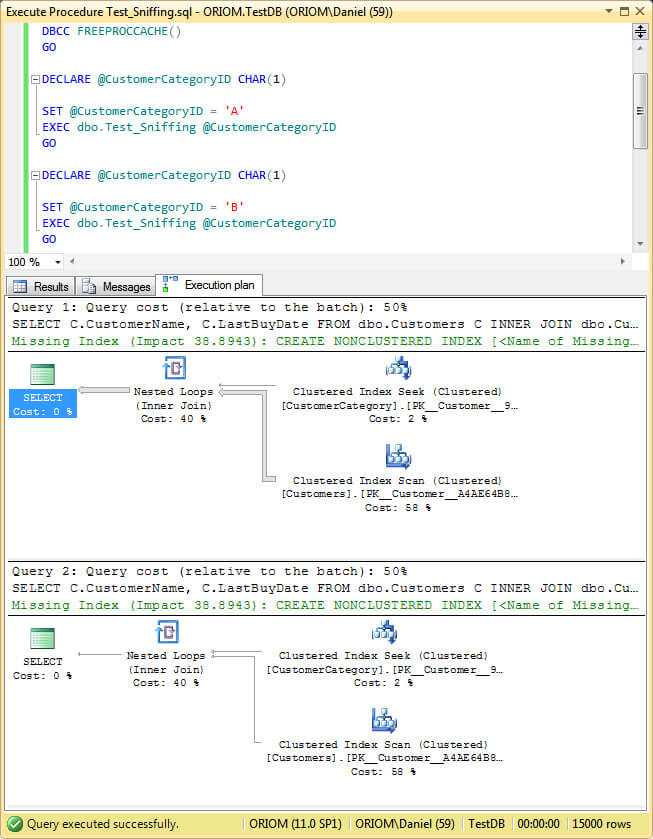
On the script we first execute the DBCC FREEPROCCACHE to clean the plan cache and then run the stored procedure. Look at the image below and you will see how the second call to the stored procedure uses the same plan without taking into consideration the parameters given.
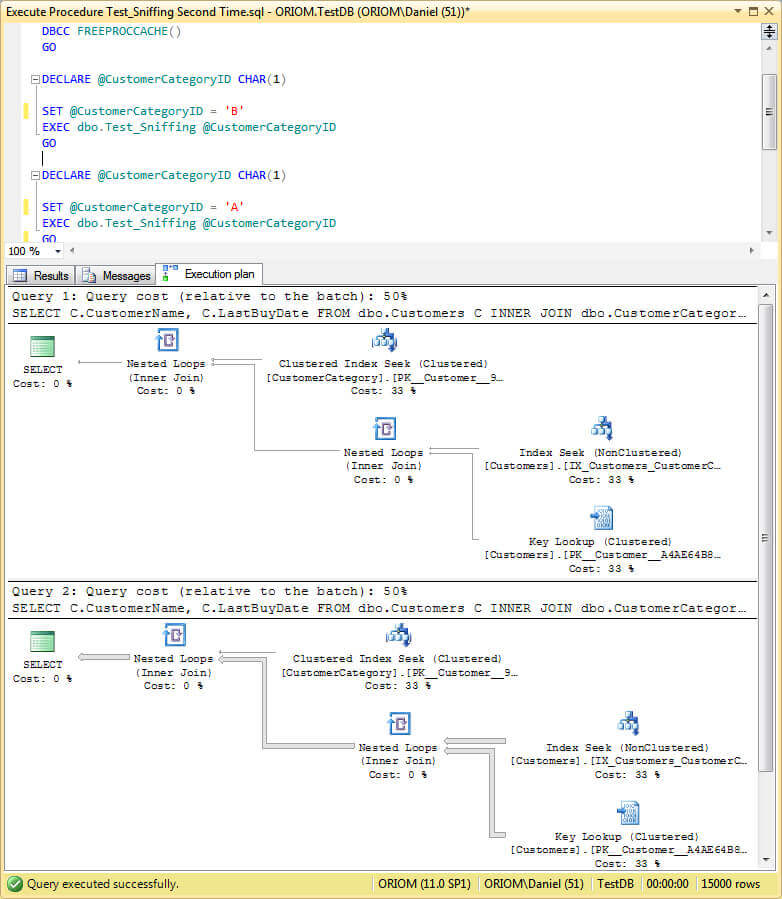
After this we perform the same steps, but with the parameters in reverse order and you will see the same behavior, but a different query plan.
Workarounds for SQL Server Parameter Sniffing
Now being exposed to the problem here are a few methods to address it:
- Create SQL Server Stored Procedures using the WITH RECOMPILE Option
- Use the SQL Server Hint OPTION (RECOMPILE)
- Use the SQL Server Hint OPTION (OPTIMIZE FOR)
- Use Dummy Variables on SQL Server Stored Procedures
- Disable SQL Server Parameter Sniffing at the Instance Level
- Disable Parameter Sniffing for a Specific SQL Server Query
Create SQL Server Stored Procedures using the WITH RECOMPILE Option
If the problem is that the optimizer uses a plan compiled with parameters that are no longer suitable then a recompilation will create a new plan with the new parameters right? This is the simplest solution, but not one of the best. If the problem is a single query inside the stored procedure code then performing a recompilation of the entire procedure is not the best approach. We should correct the problematic query.
Furthermore, recompilation will increase CPU load and in heavy concurrent systems it could be as problematic as the issue we are trying to solve.
As an example, below is the sample code to create our previous stored procedure with the recompile option.
| USE testdb go CREATE PROCEDURE Test_sniffing_recompile @CustomerCategoryID CHAR(1) WITH recompile AS SELECT C.customername, C.lastbuydate FROM dbo.customers C INNER JOIN dbo.customercategory CC ON CC.customercategoryid = C.customercategoryid WHERE CC.customercategoryid = @CustomerCategoryID go |
Use the SQL Server Hint OPTION (RECOMPILE)
As I said in the previous paragraph, recompiling the whole stored procedure is not the best choice. We can take advantage of the hint RECOMPILE to recompile the awkward query alone. Look at the sample code below.
| USE testdb go CREATE PROCEDURE Test_sniffing_query_hint_option_recompile @CustomerCategoryID CHAR(1) AS SELECT C.customername, C.lastbuydate FROM dbo.customers C INNER JOIN dbo.customercategory CC ON CC.customercategoryid = C.customercategoryid WHERE CC.customercategoryid = @CustomerCategoryID OPTION(recompile) go |
Now execute the following code and look at the query plan.
| USE testdb go DBCC freeproccache() go DECLARE @CustomerCategoryID CHAR(1) SET @CustomerCategoryID = 'B' EXEC dbo.Test_sniffing_query_hint_option_recompile @CustomerCategoryID go DECLARE @CustomerCategoryID CHAR(1) SET @CustomerCategoryID = 'A' EXEC dbo.Test_sniffing_query_hint_option_recompile @CustomerCategoryID go |
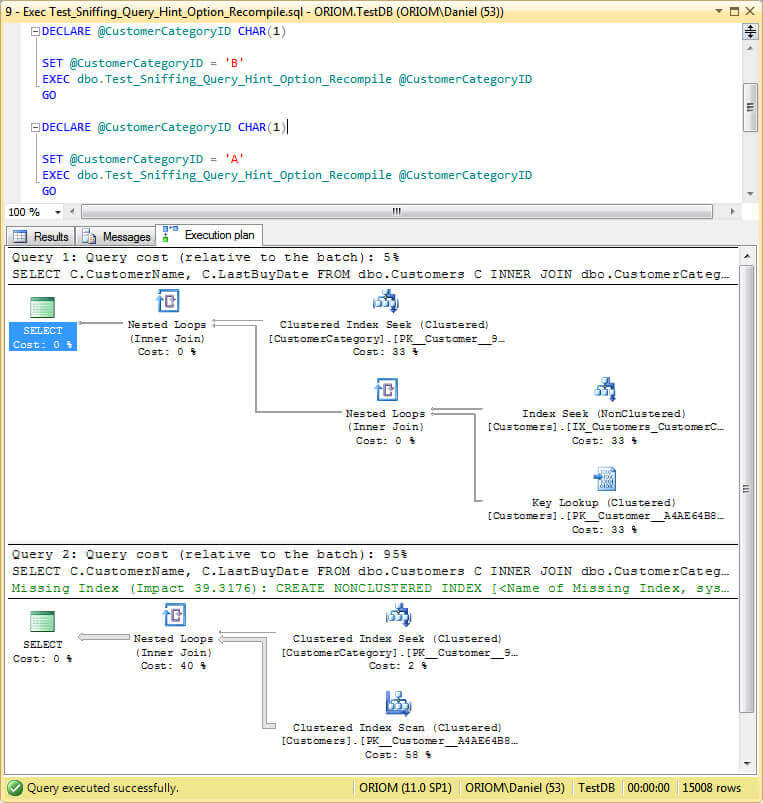
As you can see on previous image, we have the right plan according to our parameters on both queries.
Use the SQL Server Hint OPTION (OPTIMIZE FOR)
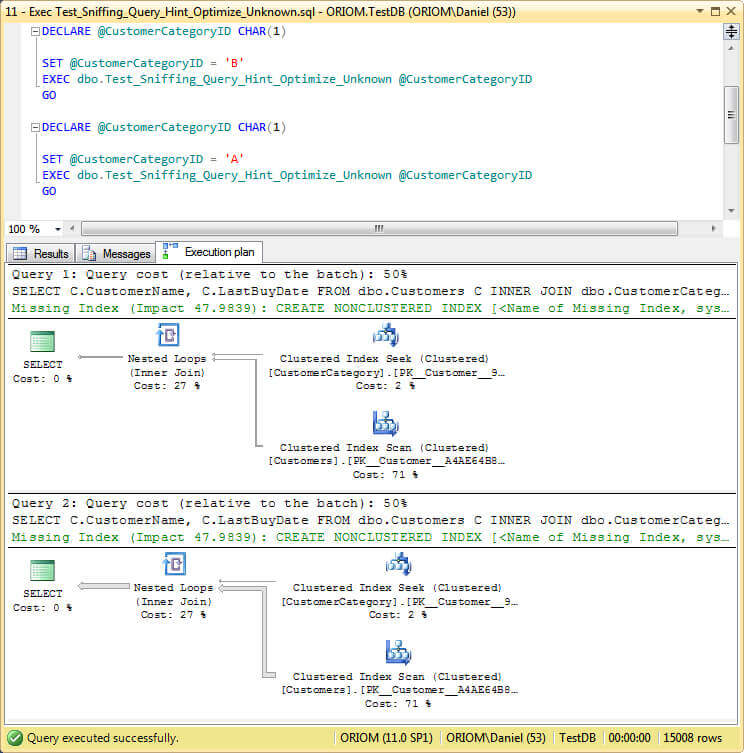
This hint will allow us to set a parameter value to use as a reference for optimization. Maybe in our scenario we can’t use this hint because we don’t know for sure which parameter values the procedure will use to execute. But if you are using SQL Server 2008 or above then OPTIMIZE FOR UNKNOWN will bring some light. I must warn you that it won’t produce the best plan, speaking in layman terms, the resulting plan will be something in between. So to use this hint you must consider how often the stored procedure is being executed with a wrong plan and how much it impacts your environment having a long running query.
Here is the sample code to use this hint.
| USE testdb go CREATE PROCEDURE Test_sniffing_query_hint_optimize_unknown @CustomerCategoryID CHAR(1) AS SELECT C.customername, C.lastbuydate FROM dbo.customers C INNER JOIN dbo.customercategory CC ON CC.customercategoryid = C.customercategoryid WHERE CC.customercategoryid = @CustomerCategoryID OPTION(optimize FOR unknown ) go |
The next script is to execute our new Stored Procedure.
| USE testdb go DBCC freeproccache() go DECLARE @CustomerCategoryID CHAR(1) SET @CustomerCategoryID = 'B' EXEC dbo.Test_sniffing_query_hint_optimize_unknown @CustomerCategoryID go DECLARE @CustomerCategoryID CHAR(1) SET @CustomerCategoryID = 'A' EXEC dbo.Test_sniffing_query_hint_optimize_unknown @CustomerCategoryID go |
And here is the screen capture of its execution plan.
Use Dummy Variables on SQL Server Stored Procedures
This is an old method used on SQL Server versions previous to 2005. It consists of assigning the input parameter to a local variable and uses this variable instead of the parameter.
Look at the sample code below.
| USE testdb go CREATE PROCEDURE Test_sniffing_dummy_var @CustomerCategoryID CHAR(1) AS DECLARE @Dummy CHAR(1) SELECT @Dummy = @CustomerCategoryID SELECT C.customername, C.lastbuydate FROM dbo.customers C INNER JOIN dbo.customercategory CC ON CC.customercategoryid = C.customercategoryid WHERE CC.customercategoryid = @Dummy go |
To execute this Stored Procedure you can use this code.
| USE testdb go DBCC freeproccache() go DECLARE @CustomerCategoryID CHAR(1) SET @CustomerCategoryID = 'B' EXEC dbo.Test_sniffing_dummy_var @CustomerCategoryID go DECLARE @CustomerCategoryID CHAR(1) SET @CustomerCategoryID = 'A' EXEC dbo.Test_sniffing_dummy_var @CustomerCategoryID go |
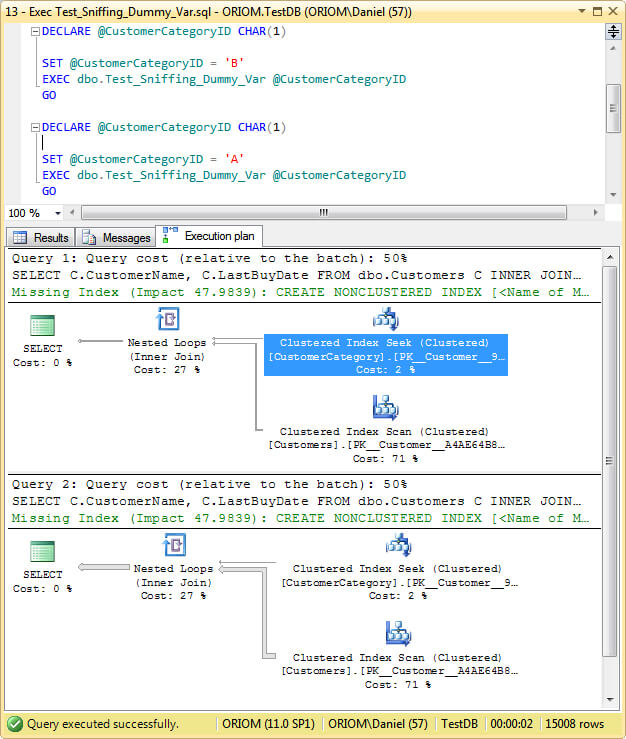
Look at the resulting plan.
Disable SQL Server Parameter Sniffing at the Instance Level
Maybe this is the worst choice you can make. As I said before, parameter sniffing is not a bad thing per se and is very useful in most cases to get the best plan. But if you want, starting the instance with trace flag 4136 set will disable parameter sniffing.
Before using this method take a look at the next one, it’s far less drastic.
Disable Parameter Sniffing for a Specific SQL Server Query
This may be unknown to you, but a query can use a trace flag as a hint to change the behavior of the query optimizer. The way to do this is by adding the QUERYTRACEON hint to the OPTION clause.
Here is the sample stored procedure followed by its execution.
USE testdb CREATE PROCEDURE test_sniffing_query_hint_querytraceon go |
| USE testdb go DBCC freeproccache() go DECLARE @CustomerCategoryID CHAR(1) SET @CustomerCategoryID = 'B' EXEC dbo.Test_sniffing_query_hint_querytraceon @CustomerCategoryID go DECLARE @CustomerCategoryID CHAR(1) SET @CustomerCategoryID = 'A' EXEC dbo.Test_sniffing_query_hint_querytraceon @CustomerCategoryID go |
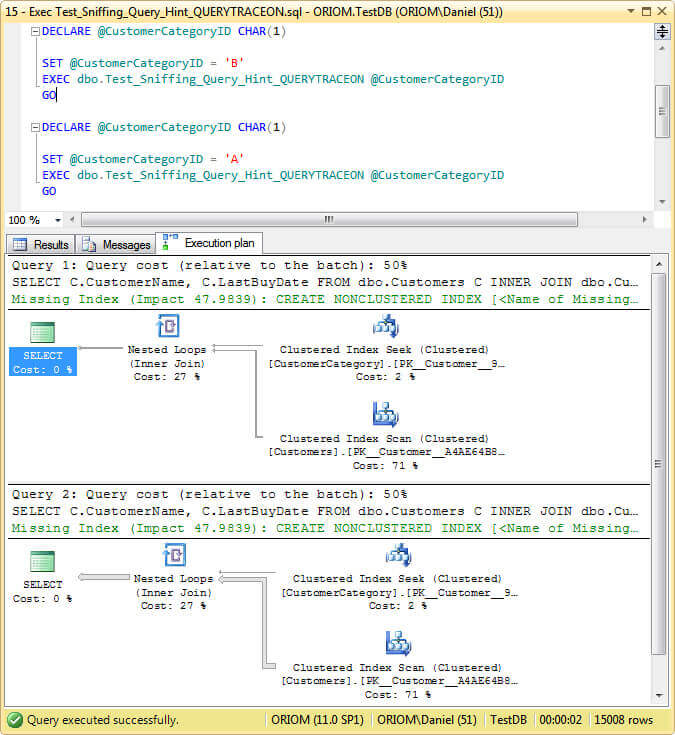
This is a screen capture of the execution plan.
Statistics Says It All
16
Years of Experience
3000
Gratified Students
100
Training Batches
9600
Training Hours
Subscribe
Please subscribe our technical blog to get recent updates.