SQL Server DBA TSQL Interview Questions5
 by
by SQL Server DBA TSQL Interview Questions 5
1. State the differences between HAVING and WHERE clauses.
| Basis for Comparison | WHERE | HAVING |
| Implemented in | Row operations | Column operations |
| Applied to | A single row | The summarized row or groups |
| Used for | Fetching specific data from specific rows according to the given condition | Fetching the entire data and separating according to the given condition |
| Aggregate functions | Cannot have them | Can have them |
| Statements | Can be used with SELECT, UPDATE, and DELETE | Cannot be used without a SELECT statement |
| GROUP BY clause | Comes after the WHERE clause | Comes before the HAVING clause |
2. What is SQL?
SQL stands for ‘Structured Query Language’ and is used for communicating with the databases. According to ANSI, SQL is the standard query language for Relational Database Management Systems (RDBMS) that is used for maintaining them and also for performing different operations of data manipulation on different types of data. Basically, it is a database language that is used for the creation and deletion of databases, and it can be used to fetch and modify the rows of a table and also for multiple other things.
3. Explain the different types of SQL commands.

- Data Definition Language: DDL is that part of SQL which defines the data structure of the database in the initial stage when the database is about to be created. It is mainly used to create and restructure database objects. Commands in DDL are:
- Create table
- Alter table
- Drop table
- Data Manipulation Language: DML is used to manipulate the already existing data in the database. That is, it helps users retrieve and manipulate the data. It is used to perform operations like inserting data into the database through the insert command, updating the data with the update command, and deleting the data from the database through the delete command.
- Data Control Language: DCL is used to control access to the data in the database. DCL commands are normally used to create objects related to user access and also to control the distribution of privileges among users. The commands that are used in DCL are Grant and Revoke.
- Transaction Control Language: It is used to control the changes made by DML commands. It also authorizes the statements to assemble in conjunction into logical transactions. The commands that are used in TCL are Commit, Rollback, Savepoint, Begin, and Transaction.
4. What is a default constraint?
Constraints are used to specify some sort of rules for processing data and limiting the type of data that can go into a table. Now, let’s understand the default constraint.
Default constraint: It is used to define a default value for a column so that the default value will be added to all the new records if no other value is specified. For example, if we assign a default constraint for the E_salary column in the below table and set the default value as 85000, then all the entries of this column will have a default value of 85000 unless no other value has been assigned during the insertion.

Now, let’s see how to set a default constraint. We will start off by creating a new table and adding a default constraint to one of its columns.
Code:
create table stu1(s_id int, s_name varchar(20), s_marks int default 50)
select *stu1
Output:

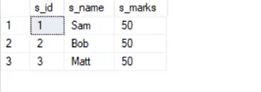
Now, we will insert the records.
Code:
insert into stu1(s_id,s_name) values(1,’Sam’)
insert into stu1(s_id,s_name) values(2,’Bob’)
insert into stu1(s_id,s_name) values(3,’Matt’)
select *from stu1
Output:
5. What is a unique constraint?
Unique constraints ensure that all the values in a column are different. For example, if we assign a unique constraint to the e_name column in the below table, then every entry in this column should have a unique value.

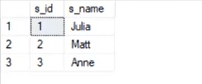
First, we will create a table.
create table stu2(s_id int unique, s_name varchar(20))
Now, we will insert the records.
insert into stu2 values(1,’Julia’)
insert into stu2 values(2,’Matt’)
insert into stu2 values(3,’Anne’)
Output:
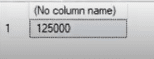
6. How would you find the second highest salary from the below table?
Code:
select * from employee
select max(e_salary) from employee where e_salary not in (select max(e_salary) from employee)
Output:
7. What is a Primary Key?
A primary key is used to uniquely identify all table records. It cannot have NULL values, and it must contain unique values. A table can have only one primary key that consists of single or multiple fields.
Now, we will write a query for demonstrating the use of a primary key for the Employee table:
//
CREATE TABLE Employee (
ID int NOT NULL,
Employee_name varchar(255) NOT NULL,
Employee_designation varchar(255),
Employee_Age int,
PRIMARY KEY (ID)
);
8. What is a Foreign Key?
A foreign key is an attribute or a set of attributes that references to the primary key of some other table. So, basically, it is used to link together two tables.
Let’s create a foreign key for the below table:

CREATE TABLE Orders (
OrderID int NOT NULL,
OrderNumber int NOT NULL,
PersonID int,
PRIMARY KEY (OrderID),
FOREIGN KEY (PersonID) REFERENCES Persons(PersonID)
)
9. What is an Index?
Indexes help speed up searching in the database. If there is no index on any column in the WHERE clause, then the SQL server has to skim through the entire table and check each and every row to find matches, which might result in slow operation on large data.
Indexes are used to find all rows matching with some columns and then to skim through only those subsets of the data to find the matches.
Syntax:
CREATE INDEX INDEX_NAME ON TABLE_NAME (COLUMN)
10. Explain the types of Indexes.

- Single-column Indexes: A single-column index is created for only one column of a table.
- Syntax:
CREATE INDEX index_name
ON table_name(column_name);
- Composite-column Indexes: A composite-column index is an index created for two or more columns of the table.
- Syntax:
CREATE INDEX index_name
ON table_name (column1, column2)
- Unique Indexes: Unique indexes are used for maintaining the data integrity of the table. They don’t allow multiple values to be inserted into the table.
- Syntax:
CREATE UNIQUE INDEX index
ON table_name(column_name)
Now, let’s move on to the next question in this ‘Top SQL Interview Questions’ blog.
11. State the differences between Clustered and Non-clustered indexes.
- Clustered index: It is used to sort the rows of data by their key values. A clustered index is like the contents of a phone book. We can open the book at ‘David’ (for ‘David, Thompson’) and find information for all Davids right next to each other. Since the data is located next to each other, it helps a lot in fetching data based on range-based queries. Also, the clustered index is actually related to how the data is stored. There is only one clustered index possible per table.
- Non-clustered index: It stores data at one location and indexes at some other location. The index has pointers that point to the location of the data. As the index in the non-clustered index is stored in different places, there can be many non-clustered indexes for a table.

Now, we will see the major differences between clustered and non-clustered indexes:
| Parameters | Clustered Index | Non-clustered Index |
| Used for | Sorting and storing records physically in memory | Creating a logical order for data rows. Pointers are used for physical data files |
| Methods for storing | Stores data in the leaf nodes of the index | Never stores data in the leaf nodes of the index |
| Size | Quite large | Comparatively, small |
| Data accessing | Fast | Slow |
| Additional disk space | Not required | Required to store indexes separately |
| Type of key | By default, the primary key of a table is a clustered index | It can be used with the unique constraint on the table that acts as a composite key |
| Main feature | Improves the performance of data retrieval | Should be created on columns used in Joins |
Now, in this ‘Top SQL Interview Questions’ blog, we will move on to the next question.
12. State the differences between SQL and PL/SQL.
| SQL | PL/SQL |
| SQL is a database structured query language. | It is a programming language for a database that uses SQL. |
| SQL is an individual query that is used to execute DML and DDL commands. | PL/SQL is a block of codes used to write the entire procedure or a function. |
| SQL is a declarative and data-oriented language. | PL/SQL is a procedural and application-oriented language. |
| It is mainly used for the manipulation of data. | It is used for creating an application. |
| It provides interaction with the database server. | It does not provide interaction with the database server. |
| It cannot contain PL/SQL code in it. | It can contain SQL in it because it is an extension of SQL. |
13. What do you understand by a Character Manipulation function?
Character manipulation functions are used for the manipulation of character data types.
Some of the character manipulation functions are:
- UPPER: It returns the string in uppercase.
- Syntax:
UPPER(‘ string’)
- Example:
SELECT UPPER(‘demo string’) from String;
- Output:
DEMO STRING
- LOWER: It returns the string in lowercase.
- Syntax:
LOWER(‘STRING’)
- Example:
SELECT LOWER (‘DEMO STRING’) from String
- Output:
demo string
- INITCAP: It converts the first letter of the string to uppercase and retains others in lowercase.
- Syntax:
Initcap(‘sTRING’)
- Example:
SELECT Initcap(‘dATASET’) from String
- Output:
Dataset
- CONCAT: It is used to concatenate two strings.
- Syntax:
CONCAT(‘str1’,’str2’)
- Example:
SELECT CONCAT(‘Data’,’Science’) from String
- Output:
Data Science
- LENGTH: It is used to get the length of a string.
- Syntax:
LENGTH(‘String’)
- Example:
SELECT LENGTH(‘Hello World’) from String
- Output:
11
Going ahead with this blog on ‘Top SQL Interview Questions,’ we will see the next question.
14. What is AUTO_INCREMENT?
AUTO_INCREMENT is used in SQL to automatically generate a unique number whenever a new record is inserted into a table.
Since the primary key is unique for each record, we add this primary field as the AUTO_INCREMENT field so that it is incremented when a new record is inserted.
The AUTO-INCREMENT value is by default starts from 1 and incremented by 1 whenever a new record is inserted.
Syntax:
CREATE TABLE Employee(
Employee_id int NOT NULL AUTO-INCREMENT,
Employee_name varchar(255) NOT NULL,
Employee_designation varchar(255)
Age int,
PRIMARY KEY (Employee_id)
)
Now, let’s move on to the next question in this ‘Top SQL Interview Questions’ blog.
15. What is the difference between DELETE and TRUNCATE commands?
- DELETE: This query is used to delete or remove one or more existing tables.
- TRUNCATE: This statement deletes all the data from inside a table.

The difference between DELETE and TRUNCATE commands are as follows:
- TRUNCATE is a DDL command, and DELETE is a DML command.
- With TRUNCATE, we can’t really execute and trigger, while with DELETE we can accomplish a trigger.
- If a table is referenced by foreign key constraints, then TRUNCATE won’t work. So, if we have a foreign key, then we have to use the DELETE command.
The syntax for the DELETE command:
DELETE FROM table_name
[WHERE condition];
- Example:
select * from stu
- Output:
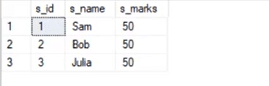
delete from stu where s_name=’Bob’
- Output:
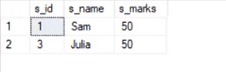
The syntax for the TRUNCATE command:
TRUNCATE TABLE
Table_name;
- Example:
select * from stu1
- Output:
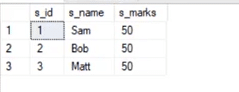
truncate table stu1
- Output:

This deletes all the records from the table.
16. What is COALESCE function?
COALESCE function takes a set of inputs and returns the first non-null value.
Syntax:
COALESCE(val1,val2,val3,……,nth val)
Example:
SELECT COALESCE(NULL, 1, 2, ‘MYSQL’)
Output:
1
17. What do you understand by Normalization and Denormalization?
Normalization and denormalization are basically two methods used in databases.

Normalization is used in reducing data redundancy and dependency by organizing fields and tables in databases. It involves constructing tables and setting up relationships between those tables according to certain rules. The redundancy and inconsistent dependency can be removed using these rules to make it more flexible.
Denormalization is contrary to normalization. In this, we basically add redundant data to speed up complex queries involving multiple tables to join. Here, we attempt to optimize the read performance of a database by adding redundant data or by grouping the data.
18. What is wrong with the below-given SQL query?
SELECT gender, AVG(age) FROM employee WHERE AVG(age)>30 GROUP BY gender
When we execute this command, we get the following error:
Msg 147, Level 16, State 1, Line 1
Aggregation may not appear in the WHERE clause unless it is in a subquery contained in a HAVING clause or a select list, the column being aggregated is an outer reference.
Msg 147, Level 16, State 1, Line 1
Invalid column name ‘gender’.
This basically means that whenever we are working with aggregate functions and we are using GROUP BY, we can’t use the WHERE clause. Therefore, instead of the WHERE clause, we should use the HAVING clause.
Also, when we are using the HAVING clause, GROUP BY should come first and HAVING should come next.
select e_gender, avg(e_age) from employee group by e_gender having avg(e_age)>30
Output:
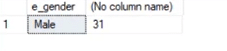
19. What do you know about the stuff() function?
The stuff function deletes a part of the string and then inserts another part into the string starting at a specified position.
Syntax:
STUFF(String1, Position, Length, String2)
Here, String1 is the one that would be overwritten. Position indicates the starting location for overwriting the string. Length is the length of the substitute string, and String2 is the string that would overwrite String1.
Example:
select stuff(‘SQL Tutorial’,1,3,’Python’)
This will change ‘SQL Tutorial’ to ‘Python Tutorial’
Output:
Python Tutorial
20. What are Views? Give an example.
Views are virtual tables used to limit the tables that we want to display, and these are nothing but the result of a SQL statement that has a name associated with it. Since views are not virtually present, they take less space to store.

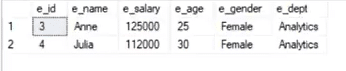
Let’s consider an example. In the below employee table, say, we want to perform multiple operations on the records with gender ‘Female’. We can create a view-only table for the female employees from the entire employee table.
Now, let’s implement it on the SQL server.
Below is our employee table:
select * from employee
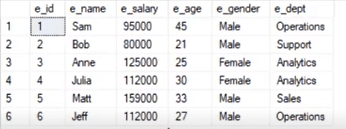
Now, we will write the syntax for view.
Syntax:
create view female_employee as select * from employee where e_gender=’Female’
select * from female_employee
Output:
21. What is a stored procedure? Give an example.
A stored procedure is a prepared SQL code that can be saved and reused. In other words, we can consider a stored procedure to be a function consisting of many SQL statements to access the database system. We can consolidate several SQL statements into a stored procedure and execute them whenever and wherever required.
A stored procedure can be used as a means of modular programming, i.e., we can create a stored procedure once, store it, and call it multiple times as required. This also supports faster execution when compared to executing multiple queries.
Syntax:
CREATE PROCEDURE procedure_name
AS
Sql_statement
GO;
To execute we will use this:
EXEC procedure_name
Example:
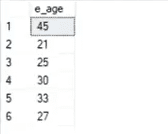
We are going to create a stored procedure that will help extract the age of the employees.
create procedure employee_age
as
select e_age from employee
go
Now, we will execute it.
exec employee_age
Output:
22. What do you know about Joins? Define different types of Joins.
The Join clause is used to combine rows from two or more tables based on a related column between them. There are various types of Joins that can be used to retrieve data, and it depends upon the relationship between tables.
There are four types of Joins:
- Inner Join: Inner Join basically returns records that have matching values in both tables.
- Left Join: Left Join returns rows that are common between the tables and all the rows of the left-hand-side table, i.e., it returns all the rows from the left-hand-side table even if there are no matches available in the right-hand-side table.
Right Join: Right Join returns rows that are common between the tables and all the rows of the right-hand-side table, i.e., it returns all the rows from the right-hand-side table even if there are no matches available in the left-hand-side table.
Full Join: Full Join returns all the rows from the left-hand-side table and all the rows from the right-hand-side table.
23. Explain Inner Join.
Inner Join basically gives us those records that have matching values in two tables.
Let us suppose, we have two tables Table A and Table B. When we apply Inner Join on these two tables, we will get only those records that are common to both Table A and Table B.
Syntax:
SELECT columns
FROM table1
INNER JOIN table2
ON table1.column_x=table2.column_y;
Example:
select * from employee
select * from department
Output:
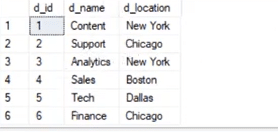
Now, we would have Inner Join in both of these tables, where the ‘e_dept’ column in the employee table is equal to the ‘d_name’ column of the department table.
Syntax:
select employee.e_name, employee.e_dept, department.d_name, department.d_location
from employee inner join department
on
employee.e_dept=department.d_name
Output: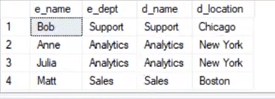
After Inner Join, we have only those records where the departments match in both tables. As we can see, the matched departments are Support, Analytics, and Sales.
24. State the differences between Views and Tables.
| Views | Tables |
| It is a virtual table that is extracted from a database. | A table is structured with a set number of columns and a boundless number of rows. |
| Views do not hold data themselves. | Table contains data and stores the data in databases. |
| A view is also utilized to query certain information contained in a few distinct tables. | A table holds fundamental client information and the cases of a characterized object. |
| In a view, we will get frequently queried information. | In a table, changing the information in the database changes the information that appears in the view |
25. What do you understand by a Temporary Table? Write a query to create a Temporary Table.
A temporary table helps us store and process intermediate results. These temporary tables are created and can be automatically deleted when they are no longer used. They are very useful in places where we need to store temporary data.
Syntax:
CREATE TABLE #table_name();
The below query will create a temporary table:
create table #book(b_id int, b_cost int)
Now, we will insert the records.
insert into #book values(1,100)
insert into #book values(2,232)
select * from #book
Output: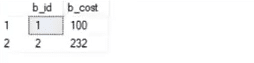
26. Explain the difference between OLTP and OLAP.

OLTP: It basically stands for Online Transaction Processing and we can consider it to be a category of software applications that is efficient for supporting transaction-oriented programs. One of the important attributes of the OLTP system is its potentiality to keep up the consistency.
The OLTP system often follows decentralized planning to keep away from single points of failure. This system is generally designed for a large audience of end-users to perform short transactions. Also, queries involved in such databases are generally simple, need fast response time, and in comparison, it returns only a few records. So, the number of transactions per second acts as an effective measure for those systems.
OLAP: OLAP stands for Online Analytical Processing and it is a category of software programs that are identified by a comparatively lower frequency of online transactions. For OLAP systems, the efficacy computing depends highly on the response time. Hence, such systems are generally used for data mining or maintaining aggregated historical data, and they are usually used in multi-dimensional schemas.
27. What do you understand by Self Join?
Self Join in SQL is used for joining a table with itself. Here, depending upon some conditions, each row of the table is joined with itself and with other rows of the table.
Syntax:
SELECT a.column_name, b.column_name
FROM table a, table b
WHERE condition
Example:
Consider the customer table given below.
| ID | Name | Age | Address | Salary |
| 1 | Anand | 32 | Ahmedabad | 2,000.00 |
| 2 | Abhishek | 25 | Delhi | 1,500.00 |
| 3 | Shivam | 23 | Kota | 2,000.00 |
| 4 | Vishal | 25 | Mumbai | 6,500.00 |
| 5 | Sayeedul | 27 | Bhopal | 8,500.00 |
| 6 | Amir | 22 | MP | 4,500.00 |
| 7 | Arpit | 24 | Indore | 10,000.00 |
We will now join the table using Self Join:
SQL> SELECT a.ID, b.NAME, a.SALARY
   FROM CUSTOMERS a, CUSTOMERS b
   WHERE a.SALARY < b.SALARY;
Output:
| ID | Name | Salary |
| 2 | Anand | 1,500.00 |
| 2 | Abhishek | 1,500.00 |
| 1 | Vishal | 2,000.00 |
| 2 | Vishal | 1,500.00 |
| 3 | Vishal | 2,000.00 |
| 6 | Vishal | 4,500.00 |
| 1 | Sayeedul | 2,000.00 |
| 2 | Sayeedul | 1,500.00 |
| 3 | Sayeedul | 2,000.00 |
| 4 | Sayeedul | 6,500.00 |
| 6 | Sayeedul | 4,500.00 |
| 1 | Amir | 2,000.00 |
| 2 | Amir | 1,500.00 |
| 3 | Amir | 2,000.00 |
| 1 | Arpit | 2,000.00 |
| 2 | Arpit | 1,500.00 |
| 3 | Arpit | 2,000.00 |
| 4 | Arpit | 6,500.00 |
| 5 | Arpit | 8,500.00 |
| 6 | Arpit | 4,500.00 |
28. What is the difference between Union and Union All operators?
The Union operator is used to combine the result set of two or more select statements. For example, the first select statement returns the fish shown in Image A, and the second returns the fish shown in Image B. Then, the Union operator will return the result of the two select statements as shown in Image A U B. Also, if there is a record present in both tables, then we will get only one of them in the final result.

Syntax:
SELECT column_list FROM table1
Union:
SELECT column_list FROM table2
Now, we will execute it in the SQL server.
These are the two tables in which we will use the Union operator.
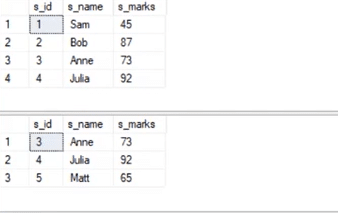
select * from student_details1
Union:
select * from student_details2
Output:
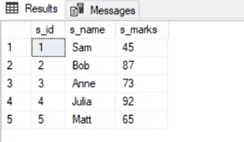
Now, Union All gives all the records from both tables including the duplicates.

Let us implement in it the SQL server.
Syntax:
select * from student_details1
Union All:
select * from student_details2
Output: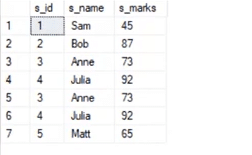
29. What is the use of the Intersect operator?
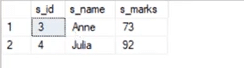
The Intersect operator helps combine two select statements and returns only those records that are common to both the select statements. So, after we get Table A and Table B over here and if we apply the Intersect operator on these two tables, then we will get only those records that are common to the result of the select statements of these two.

Syntax:
SELECT column_list FROM table1
INTERSECT
SELECT column_list FROM table2
Now, let’s see an example for the INTERSECT operator.
select * from student_details1
select * from student_details1
Output:
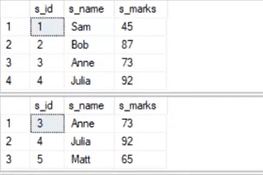
select * from student_details1
intersect
select * from student_details2
Output:
30. How can you copy data from one table into another?
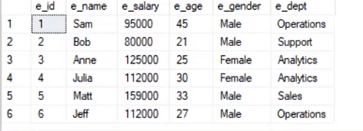
Here, we have our employee table.
We have to copy this data into another table. For this purpose, we can use the INSERT INTO SELECT operator. Before we go ahead and do that, we would have to create another table that would have the same structure as the above-given table.
Syntax:
create table employee_duplicate(
e_id int,
e_name varchar(20),
e_salary int,
e_age int,
e_gender varchar(20)
e_dept varchar(20)
)
For copying the data, we would use the following query:
insert into employee_duplicate select * from employees
Let us have a glance at the copied table.
select * from employee_duplicate
Output:
Statistics Says It All
16
Years of Experience
3000
Gratified Students
100
Training Batches
9600
Training Hours
Subscribe
Please subscribe our technical blog to get recent updates.