SQL Server DBA + SQL Programming + Azure SQL Training (Online)

By Daniel AG, #1 Database Trainer in USA!!! (*****)

Course Description

Our Microsoft SQL Server DBA and SQL Programming course (both on-prem and Azure Cloud) is designed to provide a complete learning pathway for anyone seeking to master SQL Server in today’s hybrid data landscape. Whether you are an aspiring database professional starting fresh or an experienced IT specialist looking to upgrade your skills, this course offers the knowledge and hands-on expertise you need. No prior experience is required, making it accessible to beginners, while the depth of topics ensures value for seasoned professionals.

The program begins with a solid foundation in database concepts and SQL programming using Transact-SQL (T-SQL). From there, you will gain practical knowledge in installing and configuring SQL Server, managing day-to-day database administration tasks, and implementing high availability and disaster recovery strategies to ensure business continuity. The course also emphasizes performance monitoring and tuning, equipping you with the skills to maintain stable, secure, and efficient database systems.

As cloud adoption continues to reshape IT, we include a dedicated module on Azure SQL, where you will learn administration techniques unique to Microsoft’s cloud platform. You will also gain hands-on experience with database migration strategies, enabling you to confidently move workloads from on-premises SQL Servers to Azure SQL while maintaining performance and data integrity.

To enhance the quality of learning, every participant receives official Microsoft courseware, including Querying Data with Transact-SQL and Administering Microsoft SQL Server Databases. These materials align with Microsoft’s certification tracks and can serve as valuable references even after the training is completed.

With over a decade of experience training thousands of students across the USA, Canada, and beyond, we are proud to offer high-quality, affordable programs in SQL Server, Azure, AWS, AI, and related technologies. Based in Philadelphia, USA, our training combines structured teaching, real-world case studies, and practical labs to prepare you for real-life database management scenarios in both corporate and cloud environments.

For complete course details, schedules, and registration, please contact Daniel at +1 267 718 1533 (Mobile & Whatsapp).

Daniel's Profile - #1 Database Trainer in USA!!!

Daniel brings over 16 years of experience in SQL Server Administration (on-premises and Azure), SQL Programming, business intelligence development (SSAS, SSIS, SSRS, Azure Fabric, Data Factory), data visualization (Power BI), and performance tuning. His cross-industry background gives him a unique perspective on how data design, data architecture, data management, security, and system architecture come together to deliver robust enterprise solutions.

He currently serves as a Data Architect in the healthcare industry near Philadelphia, USA, while also training and mentoring database professionals worldwide. Over the years, he has earned a reputation as one of the most trusted trainers in SQL Server, Azure Fabric, Data Engineering, Power BI, Microsoft AI, and related technologies.

Microsoft recognizes Daniel’s expertise with the following certifications:
  • Microsoft Certified SQL Server DBA
  • Microsoft Certified Azure Solutions Architect Expert
  • Microsoft Certified Azure Data Engineer
  • Microsoft Certified Trainer (MCT)
  • MCSE in Data Management and Analytics

As a trainer, Daniel has mentored more than 3,000 students across the United States, Canada, and globally, helping professionals advance their careers in SQL Server, Azure, AWS, and AI. His teaching style blends real-world project experience with a structured, hands-on approach, making complex concepts easy to understand and immediately applicable.

Connect with Daniel at +1 267 718 1533 (Mobile & Whatsapp)

.

Daniel's Technical Blog: https://empiredatasystems.com/blogs
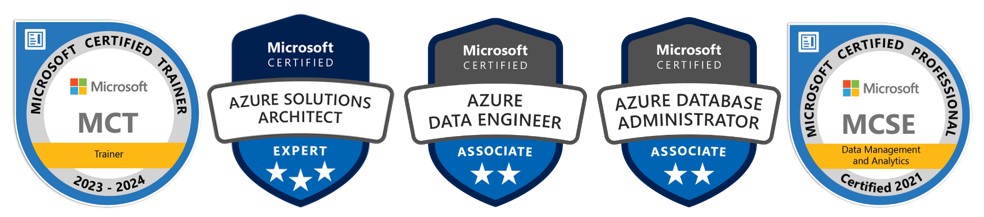

Dniel's Certifications

Talk to Daniel

Live Training Videos

We believe in letting our prospective students to watch recorded videos of our live training classes and decide for themselves. If you would still like to attend a one-on-one live demo session, please give call Daniel @ 267 718 1533 and he can schedule one for you at your convenience.
Course Content

Part 1: SQL/TSQL Programming

RDBMS Concept
  • DBMS Concept
  • RDBMS Concepts
  • ER Diagram Concepts
  • Cardinality
  • Ordinality
  • SDLC for Database design and Development
  • Normalization and De-Normalization
SQL Server Architecture
  • SQL Server edition overview
  • Introducing the tools
  • SQL Server Management Studio
  • Managing Tables with DDL
  • RDBMS Concepts
  • Cardinality
  • Ordinality
Creating schemas
  • Managing schemas
  • Referencing schemas versus using the default schema
  • Hiding schemas with synonyms
  • Building tables
Selecting appropriate data types
  • Constructing tables with CREATE TABLE
  • Different data types and what is the internal difference
  • Importance of selecting proper data types
  • Data types and performance
Adding constraints
  • Not Null
  • Primary Key
  • Foreign key
  • Unique
  • Check
  • Default
  • Candidate Key
  • Alternate Key
  • Natural Key
  • Surrogate Key
Implementing various types of joins
  • Inner joins
  • Cross joins
  • Left, right and full outer joins
  • Equijoins
  • The performance implications of joins
  • Adding filter conditions to outer joins
  • Writing self joins
  • Join algorithms(hash join, loop join and merge join)
Joining a table to itself
  • Chaining self joins
  • Solving time-interval problems
Combining queries with set operators
  • UNION
  • UNION ALL
  • INTERSECT
  • EXCEPT
Scalar and Aggregate Functions
  • Taking advantage of scalar functions
  • Converting data types
  • Handling dates
  • Manipulating strings
  • Choosing the right function for the job
Summarizing data with aggregate functions
  • COUNT
  • SUM
  • AVG
  • Equijoins
  • MIN
  • MAX
  • Managing NULLs
  • Suppressing duplicates
Grouping data
  • GROUP BY and GROUPING SETS
  • Applying conditions with HAVING
  • Calculating moving averages
Extending group queries
  • Nesting grouped aggregates
  • Joins and grouping
  • Introducing subtotals with CUBE and ROLLUP
Building crosstab reports
  • Using CASE to turn rows into columns
  • Applying PIVOT and UNPIVOT
Declaring variables and parameters
  • Creating and utilizing local variables
  • Passing input and output parameters
  • Interrogating global variables
Calling built-in scalar functions
  • Converting data using CAST and CONVERT
  • Ordering data with ranking functions
Performing Extensive Analysis with Analytic Functions
  • The OVER clause
  • Specifying the ordering before applying the function
  • Splitting the result set into logical partitions
RANK Function
  • RANK and DENSE_RANK
  • ROW_NUMBER with ordered sets
Extending the use of aggregates
  • Partitioning in multiple levels
  • Computing running totals
  • Comparing row and aggregate values
Building Sub-queries
  • Simple sub-queries
  • Sub-queries in conditions and column expressions
  • Creating multilevel sub-queries
  • Avoiding problems when sub-queries return NULLs
  • Handling multi row sub-query results
Correlated sub-queries
  • Accessing values from the outer query
  • EXISTS vs. IN
  • Identifying duplicates
  • Avoiding accidental correlation
Common table expressions (CTE)
  • Reusable sub-queries
  • Recursive sub-queries
  • Traversing hierarchies
PIVOT/UNPIVOT
  • Importance of pivoting
  • How to pivot data
Derived Tables
  • Derived table in FROM clause
  • Derived table in JOIN clause
Maintaining Data
  • Modifying data
  • Inserting, updating and deleting data
Transaction
  • ACID properties
  • Ensuring data consistency with transactions and distributed transactions
  • Isolation levels
  • Begin Transaction
  • Commit Transaction
  • Save point
  • Phantom rows
  • Non repeatable reads
  • Dirty Reads
  • Dealing with open transactions when an exception occurs
SQL Server locking fundamentals
  • Avoiding blocking problems with read-committed snapshot isolation
  • Managing locks using hints
Programming procedural statements
  • Implementing conditions with IF...ELSE
  • Looping with WHILE and GOTO
  • Creating code blocks with BEGIN...END
  • Debugging with PRINT
  • Returning data using RETURN
  • Debugging T-SQL in Management Studio
Handling errors
  • Communicating problems to the client with RAISERROR
  • Intercepting errors with TRY...CATCH
  • Dealing with open transactions when an exception occurs
Producing server-side result sets
  • Building and using temporary tables
  • Processing rows on the server with a cursor
  • Taking advantage of table variables
Views
  • Storing queries on the server
  • Concealing complexity with views
  • Indexed views
  • Partitioned views
  • Taking advantage of schema binding
  • View encryption
Functions
  • Scalar Function
  • In-Line table value function
  • Multi-statement table-valued function
  • Creating user-defined functions
  • Calculating values with scalar functions
  • Processing multiple rows returned from a table-valued function
  • Taking advantage of schema binding
  • Function encryption
Triggers
  • INSTEAD OF vs. AFTER triggers
  • Detecting row changes using the inserted and deleted tables
  • Tracking metadata changes with DDL triggers
  • Auditing user access using a LOGON trigger
  • Tracking data changes with the OUTPUT clause
  • Track column changes using UPDATE function
Stored Procedures
  • Batch and stored procedure processing
  • Minimizing network traffic using batches and procedures
  • Stored procedure compilation and execution
  • Using scalar functions
  • Table value parameters
  • Querying Multiple Tables
Temporary Tables
  • Create local temporary tables
  • Create global temporary tables
  • Table value parameter
  • Table variables
  • Common table expression (CTE)
  • Derived Tables

Part 2: Database Administration

SQL Server Installation and Features
  • Installing SQL Server
  • Choosing installation options
  • Upgrading from previous versions
  • Applying a service pack
Storage Architecture & data redundancy
  • LAN
  • SAN
  • NAS
  • LUN
  • RAID 0
  • RAID 1
  • RAID 5
  • RAID 10
  • Fiber Channel Network
  • iSCSI
Essential tools
  • SQL Server Management Studio
  • Transact-SQL
  • SQL Server Configuration Manager
Creating and Managing Databases
  • Storage structures
  • Examining disk structures
  • Creating databases and transaction logs
  • Defining file groups
Managing database space
  • Permitting automatic database growth
  • Adding database files to expand database
  • Specifying database options
  • Pages
  • Extends
Moving databases
  • Scripting objects and moving data with Transact-SQL
  • Detaching and attaching databases
Implementing Server and Database Security
  • Creating logins
  • Contrasting Windows and SQL Server authentication
  • Authorizing logins
  • Making logins members of server roles
  • Enforcing password policy
Authorizing database access
  • Adding users
  • Defining new roles
  • Delegating privileges with predefined roles
  • Assigning users to roles
  • Handling miss-mapped logins
Managing Permissions
  • Granting database-scoped privileges
  • Permitting object creation
  • Granting blanket permissionss
Schemas
  • Designing schemas
  • Assigning a default schema
Catalog Information
  • DMV
  • DMF
  • SYS tables
Handling object-level permissions
  • Limiting object access
  • Meeting complex permission requirements with roles
  • DExamining permission hierarchies
Creating and managing indexes
  • Clustered Index
  • Non Clustered Index
  • Unique Index
  • Filtered Index
  • Partitioned Index
  • Covered Index
  • Defining indexed views
  • Analyzing and repairing fragmentation
Creating and managing Statistics
  • Density of data
  • Selectivity of data
  • Rebuild Statistics
  • Histogram
Transaction Log
  • Importance of transaction log
  • Internal architecture of transaction log
  • Truncate transaction log
  • Shrink transaction log
  • Transaction log size and performance tuning
  • UNDO-REDO Transactions
System databases
  • Master
  • MSDB
  • Model
  • TempDB
  • Importance of TempDB with respect to performance
Recovering from Disasters
  • Backing up databases
  • Choosing a recovery model
  • Transaction log architecture
  • Full backup
  • Transaction log backup
  • Differential backup
  • File and File Group Backup
  • Copy Only backup
  • Partial backup
  • Log tail backup
  • Reclaiming transaction log space
Restoring databases
  • Restore a full backup
  • Restore a differential backup
  • Restore a log backup
  • Restore with NO RECOVERY
  • Restore with RECOVERY
  • Restore with RESTART
  • Point in time restore
  • MARK restore
  • Recovering user databases
  • Testing recovery scenarios
Export/Import data/database
  • Import wizard
  • Export wizard
  • Copy database wizard
Automating Tasks with Jobs and Alerts
  • The SQL Server Agent
  • Configuring the agent
  • Setting up Database Mail
Multistep jobs
  • Defining jobs to handle routine tasks
  • Creating alerts and operators
  • Associating alerts with jobs
Performing Database Maintenance
  • Database Maintenance Plan Wizard
  • Choosing maintenance tasks
  • Scheduling plan execution
  • Monitoring SQL Server
Ad hoc monitoring
  • Querying Dynamic Management Objects
  • DBCC statements
Database Availably
  • Always-On Availability Group
  • Mirroring Concepts
  • Clustering Concepts
  • Log Shipping
  • Replication
  • Attach/Detach
  • Online/Offline Mode
  • Hot/Cold/Stand by servers
SQL Server logs
  • Importance of SQL Server log file
  • How to read SQL Server log
Dead Locks
  • What is a dead lock?
  • What is a wait lock?
  • Impact of dead lock and wait lock
  • Victim of dead lock
  • Identify dead lock using profiler
  • How to avoid dead locks
  • SET DEADLOCK_PRIORITY
  • SET LOCK_TIMEOUT
Latest Topics
  • Database auditing
  • Resource governor
  • Policy management
  • Database End points(both TCP & HTTP)

Part 3: Performance Tuning

Executing queries
  • Analyzing query plans
  • Enhancing query performance
  • Testing queries
  • Selecting the best alternatives
  • Avoiding errors and pitfalls
Performance tuning tools
  • DB Engine tuning Adviser
  • SQL Profiler
  • DBCC statement
  • Perfmon Counters
Memory Management
  • DBCC PROCCACHE
  • DBCC FREEPROCCACHE
  • DBCC DROPCLEANBUFFERS
  • DBCC FLUSHPROCINDB(db_id)
  • DBCC FREESYSTEMCACHE
  • DBCC FREESESSIONCACHE
  • Tick Count
L-L-W Issues
  • Lock Issues
  • Latch Issues
  • Wait Issues
Lock Mode
  • Shared locks (S)
  • Update locks (U)
  • Exclusive locks (X)
  • Intent locks (I)
  • Schema locks (Sch)
  • Schema stability lock (Sch-S)
  • Schema modification lock (Sch-M)
  • Bulk Update locks (BU)
  • Key - Range locks
Isolotion Level
  • Read uncommitted
  • Read committed
  • Repeatable read
  • Snapshot
  • Serializable
Lock Granularity and Hierarchies
  • RID
  • KEY
  • PAGE
  • EXTEND
  • HoBT
  • TABLE
  • FILE
  • APPLICATION
  • METADATA
  • ALLOCATION_UNIT
  • DATABASE
Analyzing performance using
  • SET FORCEPLAN
  • SET SHOWPLAN_ALL
  • SET SHOWPLAN_TEXT
  • SET SHOWPLAN_XML
  • SET STATISTICS IO
  • SET STATISTICS XML
  • SET STATISTICS PROFILE
  • SET STATISTICS TIME
  • SET ANSI_DEFAULTS
  • SET ANSI_NULL_DFLT_OFF
  • SET ANSI_NULL_DFLT_ON
  • SET ANSI_NULLS
  • SET ANSI_PADDING
  • SET ANSI_WARNINGS
  • SET ARITHABORT
  • SET ARITHIGNORE
  • SET FMTONLY
  • SET NOCOUNT
  • SET NOEXEC
  • SET NUMERIC_ROUNDABORT
  • SET PARSEONLY
  • SET QUERY_GOVERNOR_COST_LIMIT
  • SET ROWCOUNT
  • SET TEXTSIZE
  • SET DEADLOCK_PRIORITY
  • SET LOCK_TIMEOUT
  • SET TRANSACTION ISOLATION LEVEL
Design effective SQL statements
  • Relating indexes to where condition
  • Order of condition in where clause
  • Query Hints
  • Table Hints
  • Join Hints
  • Increasing sort efficiency
  • Reducing I/O with covering indexes
  • Implementing sparse indexes
  • Getting design advice from built-in tuning tools
Partitioning strategies for tables
  • Horizontal partitionin
  • Vertical partitioning
Indexes tuning
  • Internal fragmentation
  • External Fragmentation
  • Rebuild Index
  • Re organize Index
  • Portioned Index
  • Filtered Index
  • Covered Index
  • Compressed Index
Statistics Tuning
  • Density of data
  • Selectivity of data
  • Rebuild Statistics
  • Histogram
  • Auto create statistics
  • Auto update statistics
  • Sync/Asyn update of statistics

Part 4: Advanced DBA Topics

Advanced DBA Topics
  • Resource Governor
  • Data collection
  • Policy Based management
  • Data Auditing
  • End Points
  • Always encrypted
  • Dynamic data masking
  • Multiple tempdb database files
  • Query store
  • Row level security
  • Stretch database
  • Temporal table
  • Enhanced in-memory OLTP
  • Truncate table with partition
  • Drop if exists
  • String split - string escape
  • Database scoped credential

Part 5: Azure SQL Infrastructure (Azure SQL + Managed Instance + Azure VM)

Azure SQL: Portfolio & setup
  • PaaS vs MI vs SQL on Azure VM; DTU vs vCore; Service tiers (GP/BC, Serverless, Hyperscale), Elastic Pools.
  • Hands-on: Create resource group, Azure SQL server + DB (PaaS), and an MI; baseline RBAC.
Azure SQL: Networking & access control
  • Public vs Private endpoints, VNet rules, Deny public network, Service Endpoints, firewall.
  • AAD admin, contained users, RBAC vs DB permissions.
  • Hands-on: Lock down with Private Endpoint, set AAD admin, create AAD users.
Azure SQL: Security deep dive
  • TDE (service-managed vs CMK in Key Vault), Always Encrypted (AEv2), Dynamic Data Masking, Row-Level Security, Auditing & Defender for SQL.
  • Hands-on: Enable TDE (CMK + AKV), set Auditing to Log Analytics/Storage, create an AE column.
Azure SQL: Backup/restore & recovery
  • Automatic backups, PITR/LTR, Geo-restore.
  • MI-specific: RESTORE FROM URL (.bak/.trn), certificate handling (TDE), msdb artifacts.
  • Hands-on: PITR restore (PaaS), long-term restore; MI restore from .bak in Blob with SAS.
Azure SQL: HA/DR patterns
  • Active Geo-Replication (per-DB), Failover Groups (server-level), listeners, failover tests.
  • MI Instance Failover Group (IFG) for cross-region, grace period/data-loss tradeoffs, zone redundancy.
  • Hands-on: Create geo-replica + FOG (PaaS); IFG between two MIs and simulate failover.
Azure SQL: Performance architecture & sizing
  • vCore sizing, IOPS/throughput limits, tempdb, storage choices, scaling (online), Hyperscale architecture, serverless auto-pause.
  • Hands-on: Measure I/O, scale up/down, bursty workload on serverless.
Azure SQL: Query performance & tuning
  • Query Store, Intelligent Query Processing, Automatic Tuning (force plan), index strategies, parameter sniffing.
  • Hands-on: Capture baseline, regress a plan, fix via QS/Auto Tuning; design covering indexes.
Azure SQL: Monitoring & automation
  • Azure Monitor metrics, Alerts, Log Analytics (KQL), Intelligent Insights, Query Performance Insight, Extended Events, DMVs.
  • Hands-on: Build alert rules, KQL workbook for top queries/waits, XE session on MI.
Azure SQL: Migration strategies
  • Assess: DMA; Migrate: DMS online/offline; bacpac/dacpac vs backup/restore (MI), transactional replication to MI, cutover planning.
  • Hands-on: DMA assessment; DMS online migration (AdventureWorksLT), post-cutover validation.
Azure SQL: DevOps & governance
  • CI/CD with sqlpackage/DACPAC (Azure DevOps/GitHub Actions), blue-green with FOG, schema drift checks, Policy/Blueprints/Tags/Locks, Cost control (Reserved vCores, right-sizing).
  • Hands-on: Build & release a DACPAC, blue-green swap using FOG listener, cost report.

Course Statistics

16

Years of Experience

3671

Gratified Students

112

Training Batches

9634

Training Hours

Gratified Student Feedback - From Year 2000

  • Trainer: Daniel

    It was a great class I learned a lot on SQL Server 2019 DBA and SQL . Thank you Daniel
    Tihitna Dargo
    Baltimore, US
  • Trainer: Daniel Ager

    I have developed into a more confident person after this class. Daniel did an excellent job in explaining and answering questions throughout the course. Thank you for your hard work in supporting us through this class.
    Galaie Jah
    Dallas, US
  • Trainer: Daniel

    Thank you Daniel. You are so dedicated , you tried your best to make things clear for us. Always happy to help us to the end. Thank you.
    Mewae Gebremariam
    Denver, US
  • Trainer: Daniel

    Great Experience . The SQL Server 2019 course was well organized and easy to understand. Will come back for an other training very soon. Thanks Daniel !!
    Abdu
    Los Angeles, US
  • Trainer: Daniel AG

    Excellent SQL server DBA training. Lot of real time scenarios and hands on labs makes the course a better learning experience.
    aristone metio
    Frisco, US
  • Trainer: Daniel AG

    Daniel AG is a wonderful Instructor. He made database learning much easier.
    Tanvir Patwary
    New York City, US
  • Trainer: Daniel AG

    I appreciate the way you give plenty of time to answer the question. Excellent SQL Server 2019 training
    Abdi Abdissa
    Minneapolis, US
  • Trainer: GIFTY TURA

    Thank you for your teaching and for your time.
    GIFTY TURA
    Tucker, US
  • Trainer: Daniel AG

    Thank you Daniel, you are the best trainer. I admire your patience and understanding you have towards your students. I've got a lot from this training.
    Rahel Asmare
    Irvine, US
  • Trainer: Daniel AG

    Nice Experience with Trainer Daniel !! The course was well organized and easy to understand. Students could ask questions as much as they want. Thanks Daniel !!
    Mohammad Zakir Hossain Khan
    New York City, US
  • Trainer: Daniel

    Great class! Wish I could keep up because it did move a bit fast for me and lots of classes within a week, however, the step by step and very detailed explanations provided by Daniel were super helpful. Also super helpful that we can download classes and practice at our own pace.
    Gelila Lulseged
    Richardson, US
  • Trainer: Daniel AG

    "Thank you for a great course. Great presentation style with lots of opportunities to ask questions and talk about real life examples which all made for a really enjoyable and informative course."
    Mitsilal tesfamariam
    Evanston, US
  • Trainer: Daniel AG

    Thank you so much for your very valuable training. I really enjoyed it, and appreciated that you made it fun! I feel much better prepared to deal with uncomfortable issues. The materials provided really helped put conflict resolution. This training helped me identify clear, do-able next steps toward resolving my own workplace conflict. I must say Daniel is a great teacher/trainer/coach.
    Youvendra Dhaker
    Indore, IN
  • Trainer: Daniel, is an amazing teacher

    Thank you! you are very good and you subjects are so detailed.
    Tehetina Tessema
    Burke, US
  • Trainer: Daniel

    I truly appreciate you and your time you spent helping me. Thank you very much for the course. I enjoyed every minute of your lecture as well as your marvelous sense of humor.
    Kibameron
    Seattle, US
  • Trainer: Daniel Ag

    Excellent course, the instructor is awesome. He is very knowledgeable with the material and the methodology of passing the course concept.
    Oluwatuyi Rufus Abidakun
    Dallas, US
  • Trainer: Daniel AG

    Daniel is a Great Teacher, his patience is remarkable, he is very knowledgeable of the course and he takes all the time needed to explain the subject and He is always available for questions. Thank you so much Daniel.
    Clarisse Umutoni
    Mableton, US
  • Trainer: Daniel AG

    Daniel is very engaging and informative in his teaching style. I would highly recommend this course for anyone interested in learning about SQL.
    Daniel Malik
    Cherry Hill, US
  • Trainer: Daniel

    Great class. Learned a lot in this class. Daniel was really helpful.
    Sheikh Omar Kanteh
    Mableton, US
  • Trainer: Daniel

    Thank you so much Daniel the SQL Server 2019 DBA/TSQL course was great that all the lectures were recorded and put on OneDrive so that I can download and use it with my studying anytime, I can follow in class and not worrying about taking notes. Furthermore, you provide with additional reading materials, labs, and research papers which helped me to widen up my knowledge on the said course. Thank you for your valuable training and sharing your wide knowledge and experience. I really enjoyed it, and really appreciated for that. Keep it up. Thank you
    Menen Weldetekle
    Gastonia, US
  • Trainer: Daniel AG

    Daniel Teaching methods are great. Very clear and concise and Always lectures with intent to help you understand the material. As a student, you feel pushed to learn and try out SQL Competencies, Feel safe and supported in doing so and gain valuable feedback that helps you to improve.
    Nadeem Arshad
    Washington, US
  • Trainer: Daniel AG

    The Training sessions were awesome also recorded for playbacks. The teacher is always eager to answer any question and he is well experienced.
    Chukwunonso Adirika
    South Jacksonville, US
  • Trainer: Daniel AG

    Daniel is very good teacher, tutor and can pass on information very well. He makes the course easier to understand.
    Marian Mamaha Hazeley
    New York City, US
  • Trainer: Daniel AG

    I am so impressed with the Daniel AG Deep Knowledge , Teaching Style , Amazing supportive environment including training cost , inclusive approach and all round gifted approach in all regards. I have no words to express my appreciation to Trainer Daniel and simply May God bless Him!!
    Amanueal Shiferaw Ermago
    Baltimore, US
  • Trainer: DANIEL

    It was an interesting time with Daniel and I learned a lot of insights from DBA/TSQL which initiates me to go further in the IT fields.
    TADESSE SHIFERAW DIMBISSO
    Baltimore, US

Empire Data Systems

Social Links